The AI handwritten assignment grader that reads student handwriting
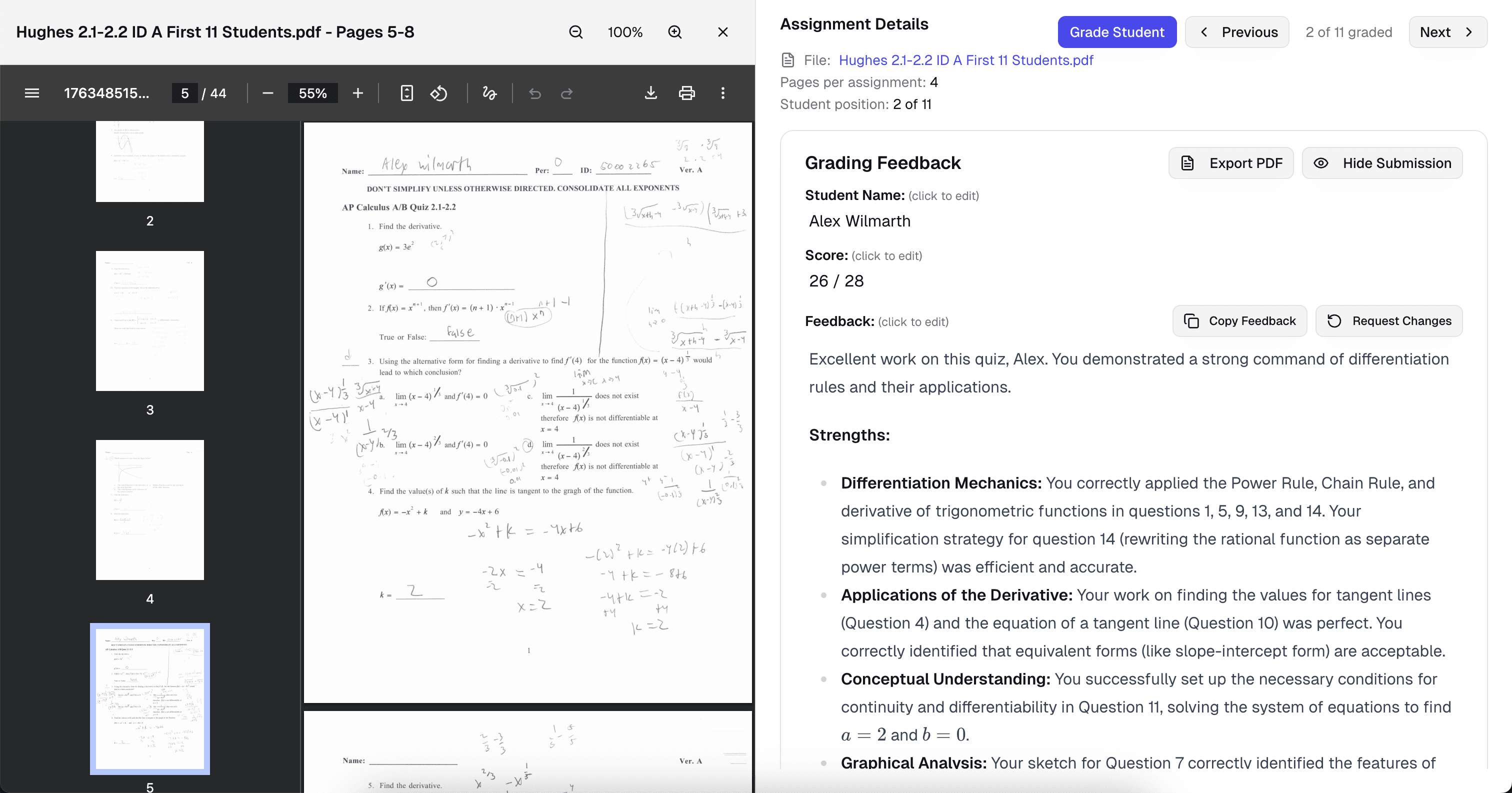
Snap a phone photo of the paper stack or drop in a PDF of scanned work. The AI transcribes every page — cursive, print, diagrams, worked math — then grades it against your rubric with line-level feedback. Every score and comment is editable before anything reaches students.
Free plan · Phone-photo quality is enough · Reads cursive, print, and math notation
Trusted by 10,000+ teachers for handwritten assignment grading
Why handwritten grading takes forever
Paper assignments should not mean Sunday disappears.
Handwritten work has a real purpose — it slows thinking down, shows the steps, and keeps phones off desks. But grading it is where the evenings go. You squint at cursive, re-read the same paragraph three times to catch a sign error, then still write the same five comments across a stack of forty. A good AI handwritten assignment grader fixes the transcription problem and the feedback problem at the same time, without turning your paper-first classroom into a digital-only one.
- Reading takes longer than grading
- Half the time is spent decoding handwriting, not judging the work. By paper fifteen, fatigue starts affecting both the transcription and the score.
- Feedback gets compressed
- When time runs short, handwritten feedback collapses into checkmarks and a number. Students learn nothing from a score they cannot trace back to a specific line.
- No audit trail for students
- A red mark in the margin does not help a student who is studying three weeks later. Digital feedback they can re-read is what moves the next assignment.
Handwriting, transcribed
A handwritten assignment grader that actually reads cursive
Upload a scan or a phone photo and the AI transcribes every page — cursive, print, mixed, fraction bars, diagrams, and worked math notation. Ambiguous sections are flagged for your review instead of silently guessed, so you never return a grade based on a misread word. Teachers with mixed digital-and-paper classes grade both the same way.
- Period 4 · Avery T.
- Graded
- Period 4 · Jordan K.
- Graded
- Period 4 · Sam R.
- Grading…
- Period 4 · Mia L.
- Queued
- Period 4 · Dev P.
- Queued
Illegible flag · Sam R., page 2 — one line unreadable. Click to clarify.
- Phone-photo quality is enough
- No dedicated scanner needed. Good lighting and a flat page beat high resolution every time.
- Cursive, print, and math notation
- Fraction bars, exponents, integrals, summation symbols, labeled diagrams — the AI reads the notation, not just the words.
- Unreadable sections flagged, not guessed
- If a step is truly illegible, the AI asks you to clarify. No silent hallucinations on student work.
Example rubric
A rubric that works for paper-based assignments
Handwritten work is graded against whatever rubric you already use. If you do not have one, the AI generates a four-criterion default from the assignment prompt — editable before the first paper is scored.
Handwritten grading rubric · AI-generated
Task completion
4 ptsAll required parts of the assignment are attempted and addressed at the expected depth.
- Strong
- Every section of the handout is completed; no blank pages or skipped problems.
- Developing
- Most sections completed; one or two are thin, skipped, or abandoned partway.
- Beginning
- Multiple sections missing, unattempted, or well below expected depth.
Accuracy of work
5 ptsWritten answers, calculations, diagrams, and reasoning are correct and specific.
- Strong
- Answers are correct and the reasoning or work shown supports each one.
- Developing
- Core idea is right but contains minor errors — a slip in arithmetic, a mislabeled axis, a misused term.
- Beginning
- Significant conceptual errors or calculations that invalidate the answer.
Work shown & process
4 ptsSteps, labels, or supporting work are visible and follow a logical order.
- Strong
- Steps are labeled, units included, and the grader can follow the student's thinking without interpretation.
- Developing
- Some steps shown but gaps force the grader to infer what the student did.
- Beginning
- Only final answers provided or work is disorganized enough to be unusable as evidence.
Presentation & legibility
2 ptsHandwriting, layout, and organization make the work readable for someone other than the student.
- Strong
- Legible throughout; sections are labeled; diagrams are neat enough to interpret.
- Developing
- Mostly legible; occasional smudges, crossed-out work, or crowded margins.
- Beginning
- Frequent illegibility or disorganization that prevents a grader from scoring the work reliably.
AI detection, even on paper
Know whether the writing was drafted by the student
Handwritten submissions are not immune to AI use — students copy generated text onto paper all the time. After transcribing the page, GradeWithAI runs the same AI-use detection it runs on typed work: a 0–100% score, a plain-language label, and the specific passages most likely to have been generated and copied by hand.
Words analyzed: 1,247
Text used for detection
The rapid proliferation of digital platforms has fundamentally altered the landscape of modern discourse, necessitating a reevaluation of longstanding epistemic frameworks.

In my experience, social media makes it easier to find people who think like me, but harder to meet people who don't.

Furthermore, the implications of this paradigm shift extend beyond mere communication into the very structure of civic engagement itself.
- Detection on transcribed text
- Once the handwriting is transcribed, detection runs on the prose — not on the handwriting itself, which is where other tools get confused.
- Plain-language labels
- Human Written, Mostly Human, Mostly AI, or AI Generated — paired with the passages that drove the score.
- Teacher discretion preserved
- Detection is a signal, not a verdict. You decide how to handle flagged work and can add context to the comment before returning.
Sample AI feedback
Feedback that points to the student's actual handwriting
Here is the AI feedback on the accuracy criterion of a handwritten algebra assignment. Notice it quotes the student's own work — line numbers from the page — names the rubric language, and gives a concrete revision path.
Assignment prompt
Solve for x: 3(2x − 4) = 18. Show your work on the lined paper provided.
Student submission
Line 1: 3(2x − 4) = 18. Line 2: 6x − 4 = 18. Line 3: 6x = 22. Line 4: x = 22/6 = 3.67.
AI feedback · Accuracy of work
3 / 5The setup is right and the approach — distribute, then isolate x — is the expected method. Accuracy lands in the “Developing” band because line 2 drops the multiplier: 3 times −4 is −12, not −4. Every downstream line inherits that error, which is why the final answer lands at 3.67 instead of 5. Partial credit for a clean method carried through consistently, but full accuracy credit withheld because the arithmetic error changed the final answer.
Revision tip · Re-check line 2: distributing 3 across (2x − 4) gives 6x − 12, not 6x − 4. Correcting that single line gives x = 5 and the rest of the work comes out clean.
- Quotes the student's actual work
- Feedback points to specific sentences and claims the student wrote, not vague impressions.
- Names the rubric language
- Comments reuse the criteria you set, so students learn what the rubric actually asks for.
- Suggests a concrete revision
- Every comment ends with a specific next step the student can take on the next draft.
Built for handwritten assignment grading
Every detail, handled
- Scans, photos, and PDFs
- Drop in a classroom scanner PDF, phone photos of individual pages, or a folder of images. Everything lands in one grading queue.
- Any subject, any page layout
- Math worksheets, history short-answer, science lab notebooks, ELA responses, language worksheets — the AI reads the page layout and grades against your rubric.
- Class-wide analytics per assignment
- See the criterion-by-criterion distribution for the whole class so you know which rubric row or problem to reteach tomorrow.
- LMS sync for the final grade
- Scores and comments from paper assignments push back to Canvas, Google Classroom, or Schoology so the gradebook stays in sync.
Why teachers switch
A handwritten assignment grader that saves the evening
Teachers using GradeWithAI as their handwritten assignment grader report the paper stack taking the same time as the digital one — usually 60–80% less than the old red-pen-and-transcribe workflow. Feedback gets longer and more specific, not shorter, because the AI handles transcription so you can focus on judgment.
Handwriting transcribed without manual retyping
Rubric-aligned scores across the full paper stack
Line-level feedback students can re-read weeks later
AI-use detection on transcribed writing at no extra cost
Mixed digital + paper classes graded in one queue
Every AI score editable before anything reaches students
“GradeWithAI [provides] students with timely individualized feedback on their homework assignments and formative assessments. This is a job that is virtually impossible for a teacher to do on a regular basis.”

Why it matters for handwritten assignment grading
Teachers using GradeWithAI as their handwritten assignment grader report the paper stack taking the same time as the digital one — usually 60–80% less than the old red-pen-and-transcribe workflow. Feedback gets longer and more specific, not shorter, because the AI handles transcription so you can focus on judgment.
How handwritten grading works
From the paper stack to graded in minutes
Scan or snap, upload, pick your rubric. The transcription, grading, and feedback drafting happen while you review the first few pages.
- 1
Upload the scans or photos
Drag in a PDF from the classroom scanner or a folder of phone photos. Student names attach automatically when the LMS is connected.
- 2
Pick your rubric
Use your own rubric, generate one from the assignment prompt, or tweak the built-in handwritten default. The AI applies it consistently.
- 3
Review and return
Scores and comments are already drafted. Approve, edit, or rewrite — then push everything to the gradebook in one click.
Also covered
Handwritten grading across every course
The same handwritten assignment grader adapts to whatever paper-based work your classroom runs on:
- Math grader
- Handwritten math work graded step-by-step, with partial credit for correct setup and full transcription of fraction and calculus notation.
- Assignment grader
- One grader for every assignment you collect — essays, short answers, worksheets, projects, lab reports — paper or digital.
- Essay grader
- Handwritten essays transcribed and scored against your rubric with quoted evidence and AI-use detection.
- Short-answer grader
- Handwritten constructed-response questions graded for accuracy and specificity with semantic matching.
Simple, transparent pricing
Start free and upgrade when you’re ready.
Free
Perfect for trying out AI grading.
- 25 AI requests/month
- Google Classroom integration
- Canvas integration
- Google Forms grading
- Handwritten assignment support
- AI rubric generation
- Unlimited Kleo AI assistant
Pro
Unlimited grading for dedicated educators.
- Unlimited AI requests
- Automated submissions grading
- AI detection on every submission
- Custom instructions
- Everything in Free
Schools & Districts
CustomEnterprise features for your entire school.
- Bulk user management
- Admin dashboard & analytics
- SSO / SAML authentication
- Dedicated onboarding & training
- Everything in Pro
Secure by design.
Built for K-12.
FERPA-aligned workflows, encryption everywhere, and no student data in model training. Ready for your district’s IT review from day one.
- FERPA-aligned
- SOC 2 practices
- AES-256 at rest
- TLS 1.2+ in transit
- Role-based access
- No AI training
- FERPA-aligned by default
- Role-based access and audit trails protect student submissions and grades.
- Never used for training
- Student work is processed for grading only — never used to train AI models.
- District-ready docs
- Security documentation and procurement support ready for your IT team.
Questions, answered
Handwritten grading FAQ
Answers to the questions we hear most from teachers using GradeWithAI for handwritten assignment grading. Start a free account and explore in minutes, or email john@gradewithai.com for a fast reply.
On typical student handwriting — cursive or print — GradeWithAI's transcription accuracy is close to 100% on legible work. Ambiguous characters or truly illegible sections are flagged for your review rather than silently guessed, so you never return a grade based on a misread word. Phone-photo quality is usually enough; good lighting and a flat page matter more than resolution.
By assignment
More grading guides


Ready to grade the paper stack in the time it takes to read three?
Join teachers grading handwritten work without the red-pen evenings — same rubric, better feedback, gradebook synced in one click.
Free plan available · No credit card required
Teachers using GradeWithAI report grading in a fraction of the time, with richer feedback for every student.