The AI test grader for any test format
Grade mixed-format tests — multiple choice, true/false, short answer, essay — in a single workflow. Bubble sheets scanned, constructed responses graded against your rubric, and AI-powered item analysis ready whenever you want to see which question to reteach.
Free plan · Scanned paper tests or digital · AI-powered item analysis
Trusted by 10,000+ teachers for test grading
Why test grading takes the weekend
A scantron handles the bubbles. The rest is why you need a test grader.
A typical unit test mixes 30 multiple choice, 4 short answers, and an essay. The scantron grades the first section in a minute — then the other two sections (30 students × 4 short answers + an essay = 150+ constructed responses) eat most of a Saturday. Teachers have been looking for a real AI test grader for exactly this reason: without one, feedback lands ten days late and the material has already moved on.
- Mixed formats fragment the workflow
- Scantron for MC, computer for digital tests, pen for written answers. Three separate grading loops per test.
- Item analysis is an afterthought
- Which question did the class bomb? Without analytics, you're relying on impression — which means the same unit gets re-taught the same way next year.
- Short-answer grading is inconsistent
- You're tired by question 150. The answer that got full credit at 9am is marked partial at 11pm. Students notice when they see each other's tests.
Mixed-format test grading
A test grader that handles every question type in one pass
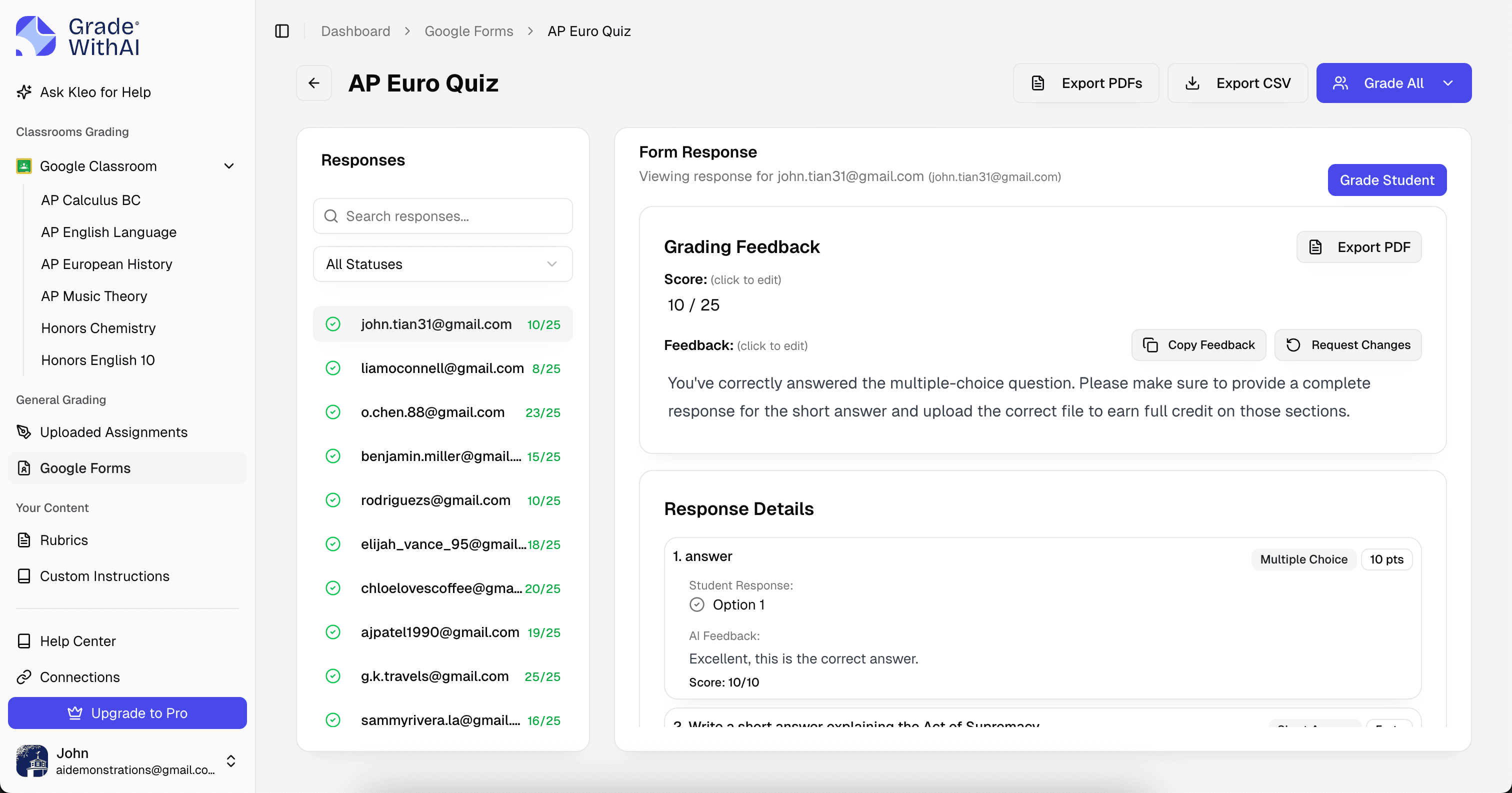
Upload the test and the answer key. The AI test grader handles multiple choice, true/false, matching, fill-in-the-blank, short answer, and essay questions together — not as three separate workflows. You see each student's full test in one view with per-question scores and the overall grade, ready to sync to your gradebook.
- Multiple choice & true/false
- Scored instantly against the answer key. Partial credit available for true/false with reasoning requirements.
- Short answer & fill-in-the-blank
- Semantic matching, so paraphrased answers get credit. Partial credit for partial understanding.
- Essay questions
- Graded against a rubric you define for the essay — or the auto-generated one from the prompt.
Example rubric
A mixed-format test rubric
Tests typically carry a point scheme, not a leveled rubric. Here's a representative point distribution; the AI grades each question against its specific criteria.
Test grading rubric · AI-generated
Multiple choice (20 × 1 pt)
20 ptsScored against the answer key with optional partial credit for questions with multiple defensible answers.
- Correct
- Matches the keyed answer (or an accepted alternative).
- Partial
- Selected answer is defensible but not the best fit; partial credit available if enabled.
- Incorrect
- Answer does not match the key and is not an accepted alternative.
Short answer (4 × 4 pts)
16 ptsSemantic matching with 4-point rubric: accuracy + specificity + reasoning + completeness.
- Full (4)
- Correct, specific, reasoned, and complete.
- Partial (2–3)
- Core idea correct; missing specificity, reasoning, or one part of a multi-part question.
- Minimal (0–1)
- Incorrect or off-prompt; partial credit only for clearly attempted reasoning.
Essay (1 × 14 pts)
14 ptsRubric-based essay scoring. Choose from argumentative, analytical, or content-area rubric.
- Strong (11–14)
- Thesis, evidence, organization, and mechanics all meet or exceed expectations.
- Proficient (7–10)
- Thesis and evidence are present; organization or mechanics need work.
- Developing (0–6)
- Thesis vague or evidence thin; organization or mechanics significantly interfere.
AI item analysis
Ask the AI for item analysis after you grade
Item analysis isn't auto-generated — it's a question away. Once grading finishes, ask the built-in AI assistant (Kleo) "which questions did the class miss?" or "show me distractor patterns on the multiple choice" and it works from the actual graded data to return per-question performance, common wrong-answer patterns, and reteach candidates.
- Question 1
- 92%
- On track
- Question 2
- 78%
- On track
- Question 3
- 41%
- Reteach
- Question 4
- 85%
- On track
- Question 5
- 36%
- Reteach
- Question 6
- 69%
- Watch
Reteach focus · Questions 3 and 5 flagged for class-wide review tomorrow.
- Ask in plain language
- Skip the spreadsheet. Ask things like "which questions had split answers?" or "how did period 4 compare to period 6?" and the AI answers from the grading results.
- Grounded in your actual class
- The AI reads the graded submissions you just finished, so the analysis reflects your students and your rubric — not a generic dashboard.
- From analysis to lesson plan
- Ask the AI to draft a warm-up or reteach activity targeting the specific misconceptions it surfaced, then push it straight into tomorrow's lesson.
Sample AI feedback
Short-answer feedback inside a full test
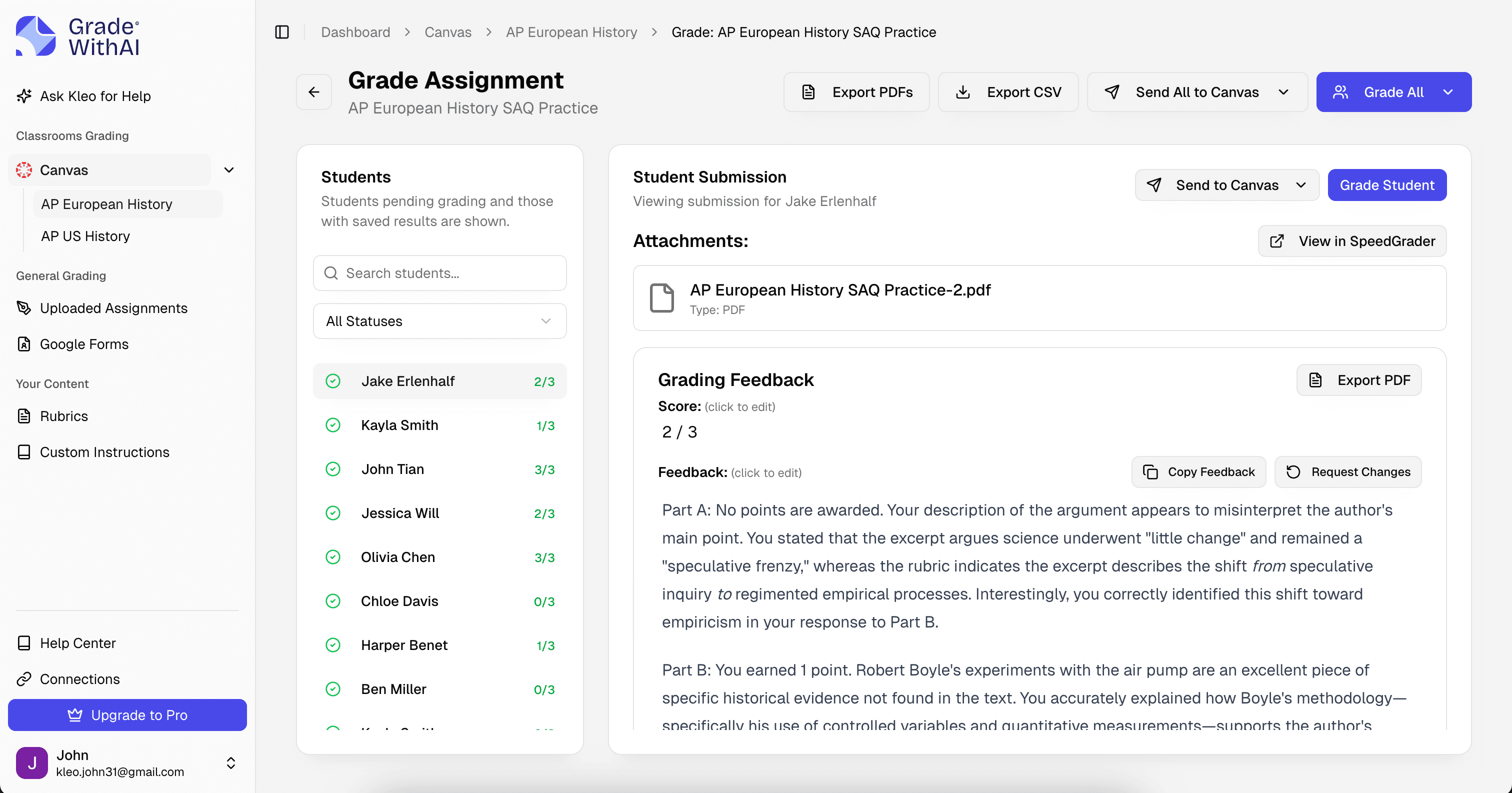
Here's one short-answer response from a larger unit test on the American Revolution. The AI grades this alongside 20 MC questions and an essay — but the feedback for each question is specific.
Assignment prompt
Explain one reason the American colonists believed they deserved independence from Britain. (4 pts)
Student submission
The colonists thought they deserved independence because Britain was taxing them without representation. They felt like the government didn't care about what they wanted. This was one of the main reasons they rebelled.
AI feedback · Specificity + Reasoning
3 / 4Accuracy is correct (taxation without representation is a valid reason) and completeness is fine (one reason explained). Where it falls short is specificity — no specific tax, act, or event is named. Reasoning is adequate but could be strengthened by connecting a specific act to a specific colonial response (e.g., the Stamp Act leading to the Stamp Act Congress of 1765). 3 of 4.
Revision tip · Name a specific tax or act — the Stamp Act (1765), the Townshend Acts (1767), or the Tea Act (1773) — and tie it to a specific colonial response. That concrete example is the 4-point move.
- Quotes the student's actual work
- Feedback points to specific sentences and claims the student wrote, not vague impressions.
- Names the rubric language
- Comments reuse the criteria you set, so students learn what the rubric actually asks for.
- Suggests a concrete revision
- Every comment ends with a specific next step the student can take on the next draft.
Built for test grading
Every detail, handled
- Paper tests included
- Scan bubble sheets and written responses together. The AI handles bubble-sheet OCR and handwritten short answers in one pass.
- Answer key flexibility
- Multiple acceptable answers, partial credit rules, and negative marking (when used) all configurable per question.
- Test banks and randomization
- If your LMS randomizes questions per student, the AI matches each student's test to the correct answer key automatically.
- Curve and scale support
- Apply a curve after grading, or use standards-based grading with leveled outcomes rather than points.
Why teachers switch
The AI test grader that gives tests back before students forget
Tests only teach if feedback arrives while the content is fresh. The 10-day gap between “turned in” and “handed back” is where learning dies. GradeWithAI collapses that gap so every test grader workflow — MC, short answer, essay — runs in one pass and feedback lands while the unit is still open.
Mixed-format tests graded in a single workflow
Scanned paper tests and digital tests supported equally
AI-powered item analysis and reteach planning after grading
Partial credit applied consistently across the class
Essay questions graded against your rubric
Sync back to Canvas, Google Classroom, or Schoology
“GradeWithAI doesn't just grade. It gives the student reasoning as to why every point is awarded or not awarded. That is a very valuable thing for the students.”

Why it matters for test grading
Tests only teach if feedback arrives while the content is fresh. The 10-day gap between “turned in” and “handed back” is where learning dies. GradeWithAI collapses that gap so every test grader workflow — MC, short answer, essay — runs in one pass and feedback lands while the unit is still open.
How test grading works
From test stack to gradebook in minutes
Three steps, whether the test is on paper, in Canvas, or split across both.
- 1
Upload test + answer key
Drop the test file and answer key. For scanned paper tests, upload the filled sheets. For Canvas tests, sync the quiz and the AI pulls submissions automatically.
- 2
Set essay rubrics
For any essay or long-form question, pick or paste a rubric. Short-answer rubrics can be auto-generated from the prompt.
- 3
Review & return
See each student's full test with per-question scores. Ask the AI for class-wide item analysis when you want it, adjust anything, and sync grades to your gradebook.
Also covered
Test grading across every format you give
The AI test grader handles every assessment format teachers actually use — plus dedicated workflows for the question types that live inside tests:
- Short-answer & SAQ grader
- Short-answer questions graded at scale with semantic matching, per-question accuracy flags, and AP SAQ rubric support.
- Essay questions on exams
- In-test essay questions graded against your rubric with criterion-level feedback and quoted evidence.
- AP FRQ grader
- AP free-response questions graded point-by-point against College Board rubrics for every AP course.
- Math tests
- Math tests with mixed MC and free-response questions graded with partial credit and step-by-step reasoning checks.
- AP exam practice tests
- Full-length AP-style practice tests scored against College Board rubrics for every section.
Simple, transparent pricing
Start free and upgrade when you’re ready.
Free
Perfect for trying out AI grading.
- 25 AI requests/month
- Google Classroom integration
- Canvas integration
- Google Forms grading
- Handwritten assignment support
- AI rubric generation
- Unlimited Kleo AI assistant
Pro
Unlimited grading for dedicated educators.
- Unlimited AI requests
- Automated submissions grading
- AI detection on every submission
- Custom instructions
- Everything in Free
Schools & Districts
CustomEnterprise features for your entire school.
- Bulk user management
- Admin dashboard & analytics
- SSO / SAML authentication
- Dedicated onboarding & training
- Everything in Pro
Secure by design.
Built for K-12.
FERPA-aligned workflows, encryption everywhere, and no student data in model training. Ready for your district’s IT review from day one.
- FERPA-aligned
- SOC 2 practices
- AES-256 at rest
- TLS 1.2+ in transit
- Role-based access
- No AI training
- FERPA-aligned by default
- Role-based access and audit trails protect student submissions and grades.
- Never used for training
- Student work is processed for grading only — never used to train AI models.
- District-ready docs
- Security documentation and procurement support ready for your IT team.
Questions, answered
Test grading FAQ
Answers to the questions we hear most from teachers using GradeWithAI for test grading. Start a free account and explore in minutes, or email john@gradewithai.com for a fast reply.
Yes. Upload your answer key and scan the filled bubble sheets. The AI reads bubble responses and scores against the key. If you want item analysis or distractor breakdowns after grading, ask the built-in AI assistant — it reads the results and generates the analysis on request. Works with standard scantron forms and custom answer sheets.
By assignment
More grading guides


Ready to try the AI test grader teachers actually trust?
Tests only teach if feedback arrives while content is fresh. Close the gap between “turned in” and “handed back” to hours, not weeks.
Free plan available · No credit card required
Teachers using GradeWithAI report grading in a fraction of the time, with richer feedback for every student.