The AI math grader that awards partial credit
GradeWithAI reads every step of student work — even handwritten — and grades it the way you would: full credit for the right path, partial credit when the setup is right, and targeted feedback at the exact line where the work broke down.
Free plan · Algebra through AP Calculus · Reads handwritten notation
Trusted by 10,000+ teachers for math grading
Why math grading takes so long
A scantron grades the final answer. An AI math grader grades the work.
The hard part of grading math has never been the final number — it is the six lines of algebra where one sign error cascades through the rest. Most math teachers lose forty minutes per class per assignment to handwritten work and fair partial credit, which is exactly why so many look for an AI math grader that reads each step rather than only checking the answer. Without one, you end up choosing between thorough feedback and finishing before midnight, and students keep repeating the same conceptual error because nobody has time to mark it.
- Every mistake is different
- A student who set up the integral wrong needs a different comment than one who botched the substitution. Generic comments like “review your work” don't fix that.
- Handwriting slows you down
- Scanning, squinting, and transcribing decimals and fraction bars takes longer than reading the math itself — especially with a class of 35 papers.
- Partial credit is inconsistent
- Two teachers grading the same paper give different scores. Even the same teacher, at 10pm vs. 10am, grades differently. Students notice.
Step-by-step math grading
An AI math grader that reads every step, not just the answer
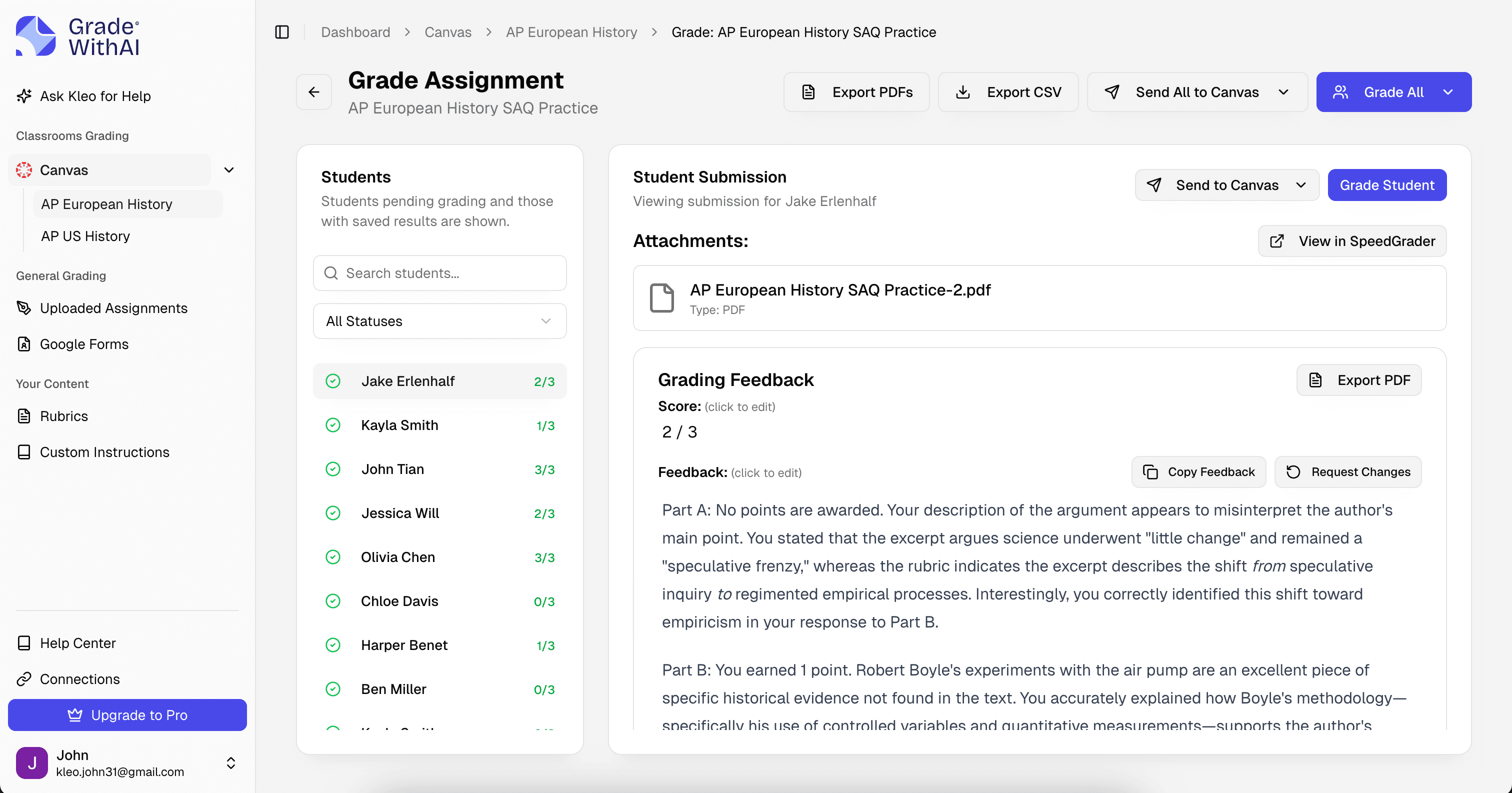
Upload a worked solution — scanned, photographed, or typed — and the AI math grader traces every step. It checks algebraic manipulations, unit conversions, and derivative and integral rules, then flags the exact line where the reasoning failed. You see the same red-pen-style annotations you would have made, ready for you to approve or override before anything reaches students.
Partial credit
3 / 5 pts
- Setup & strategy 2 / 2
- Perimeter and area equations set up correctly.
- Execution 1 / 2
- Discriminant sign flipped on last step: 400 − 384, not 400 + 384.
- Answer & units 0 / 1
- Negative width is not physically possible — signal to recheck.
- Method-aware partial credit
- Correct setup with a computational slip earns most of the points. Wrong setup with arithmetic that happens to work out loses them.
- Multiple valid approaches
- A student who solves by factoring and one who uses the quadratic formula both get full marks if the work is sound.
- Error taxonomy
- Mistakes are tagged — sign error, distribution error, conceptual gap — so class-wide analytics actually mean something.
Example rubric
The AI math grading rubric teachers actually use
Upload your own rubric or generate one from the problem set. Here is the structure the AI uses by default for a multi-step algebra or calculus FRQ — every criterion is editable before grades go live.
Math grading rubric · AI-generated
Setup & strategy
2 ptsDoes the student translate the problem into the right equation, diagram, or model before solving?
- Full
- Selects a valid approach and writes the correct starting equation or labeled diagram.
- Partial
- Identifies the concept but sets up one variable, sign, or relationship incorrectly.
- None
- Picks an approach that cannot lead to the solution or skips setup entirely.
Execution
4 ptsAlgebraic manipulation, differentiation/integration rules, unit handling, and intermediate steps.
- Full
- Every step follows from the last with no arithmetic or notation errors.
- Partial
- One or two slips (sign, transcription, factor) that do not break the logic.
- None
- Multiple errors or a single error that invalidates the rest of the work.
Answer & units
2 ptsFinal answer reported with the correct value, units, and — where appropriate — sign and reasonableness check.
- Full
- Correct value, units included, answer boxed or clearly stated.
- Partial
- Right magnitude with wrong sign or missing units, or answer left un-simplified.
- None
- Final answer is missing, unreadable, or not connected to the work shown.
Communication
2 ptsLegibility, labeled steps, and a brief justification when the problem asks for reasoning.
- Full
- Work is organized, steps are labeled, and written justification is complete.
- Partial
- Work is readable but missing labels or a short explanation the prompt asked for.
- None
- Work is unreadable or unorganized to the point a grader cannot follow it.
Handwritten work, handled
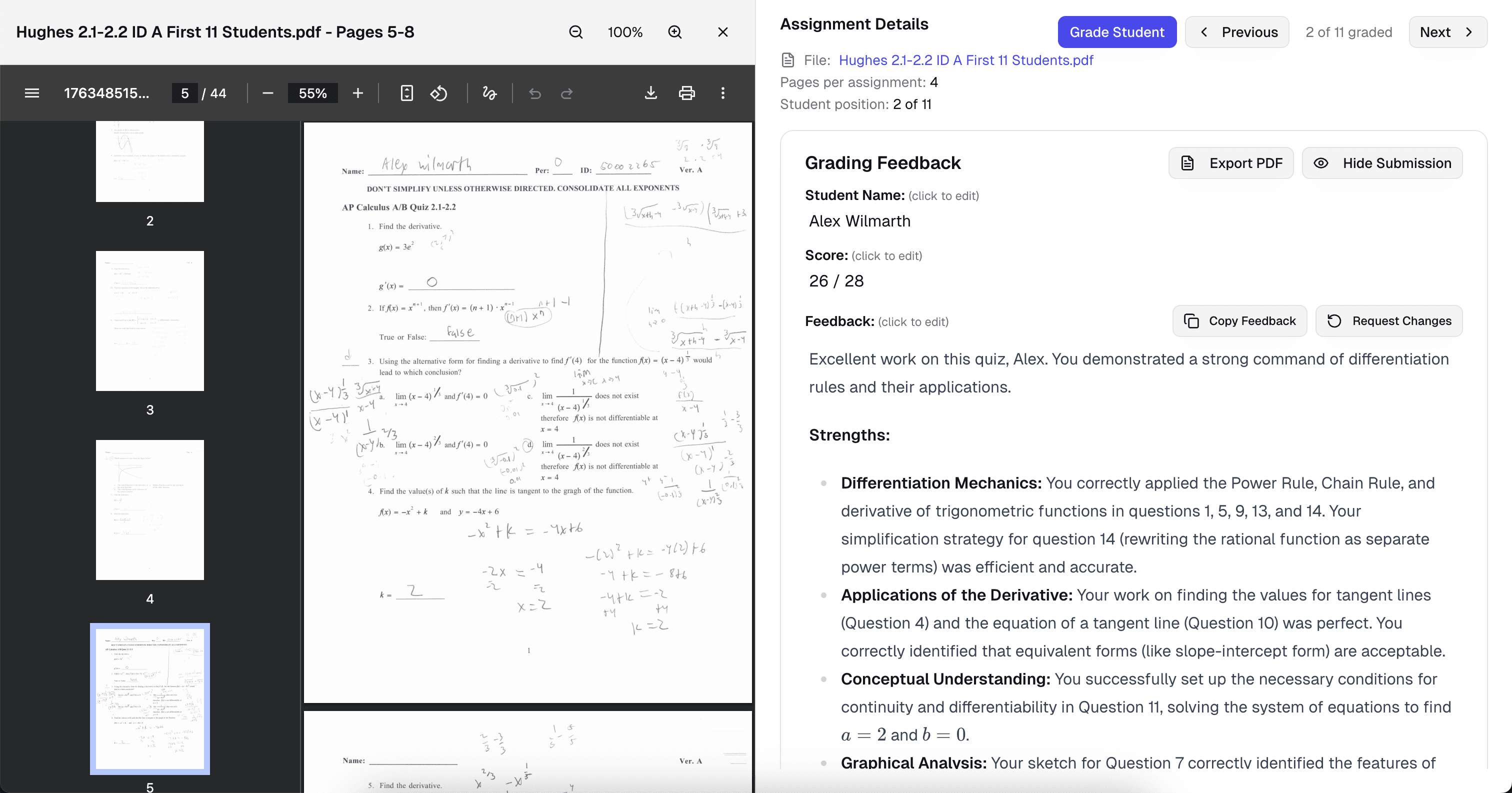
Photo it in. The AI reads fractions, integrals, and scratch-outs.
Students still do a lot of math on paper, and that is fine. Snap a photo from a phone or drop a PDF of scanned papers and the AI transcribes the work — fraction bars, summation notation, derivative primes, and all — before grading. Ambiguous handwriting is flagged for your review instead of guessed.
- Phone-photo quality is enough
- No need for a dedicated scanner. Lighting matters more than resolution.
- Mixed digital + paper classes
- Some students type, some submit photos. The same rubric grades both the same way.
- Unreadable sections are flagged
- If a step is truly illegible, you see a prompt to clarify — no silent guessing.
Sample AI feedback
Partial credit that matches your red pen
Here is how the AI scored a typical quadratic word problem — a student who set up the equation correctly but made a sign error when expanding. The comment names the specific step and suggests a concrete fix, which is what separates useful feedback from “see me.”
Assignment prompt
A rectangular garden has a perimeter of 40 m and an area of 96 m². Find the length and width.
Student submission
Let length = L, width = W. 2L + 2W = 40 → L + W = 20 → W = 20 − L. Area: L(20 − L) = 96 → 20L − L² = 96 → L² − 20L + 96 = 0. Using quadratic formula: L = (20 ± √(400 + 384)) / 2 = (20 ± √784) / 2 = (20 ± 28) / 2. So L = 24 or L = −4. Length = 24, width = −4.
AI feedback · Execution
3 / 4Setup and strategy are correct — perimeter equation and area substitution are clean, worth the full 2 points. In execution, the discriminant sign is flipped: b² − 4ac = 400 − 4(1)(96) = 16, not 784. That error pushed the answer into extraneous territory (a negative width is not physically possible, which is the signal to recheck). Partial credit of 1 point on execution; full credit withheld because the error changed the final answer.
Revision tip · Check the discriminant: b² − 4ac here should be 400 − 384, not 400 + 384. Re-run the last two steps and the answer will give real, positive dimensions for L and W.
- Quotes the student's actual work
- Feedback points to specific sentences and claims the student wrote, not vague impressions.
- Names the rubric language
- Comments reuse the criteria you set, so students learn what the rubric actually asks for.
- Suggests a concrete revision
- Every comment ends with a specific next step the student can take on the next draft.
Built for math grading
Every detail, handled
- Algebra through AP Calculus
- Trained on the full secondary curriculum: linear systems, functions, trig, logs, derivatives, integrals, series, and differential equations.
- Custom point values
- Weight setup, execution, answer, and communication however your department does it. Import your existing grading scheme.
- Works with Canvas & Google Classroom
- Pull assignments from either LMS, grade, and sync scores back to the gradebook with per-problem comments.
- AI-use detection on written responses
- Word problems with written reasoning get a separate AI-use score so you can tell generated work apart from student thinking.
Why teachers switch
An AI math grader that hands back work the next class
A first pass on thirty math papers usually takes a teacher about four hours. With GradeWithAI as your AI math grader, the first pass takes eight minutes — and you spend the rest of your prep reviewing edge cases, adjusting partial credit, and writing comments for the students who actually need a conversation.
Partial credit applied consistently across a full class
Step-by-step error identification — not just “wrong”
Handwritten work graded without manual transcription
Error analytics show the concept the class missed most
Students see the exact step to fix, not a score in isolation
Edit any AI score or comment before results go live
“GradeWithAI [provides] students with timely individualized feedback on their homework assignments and formative assessments. This is a job that is virtually impossible for a teacher to do on a regular basis.”

Why it matters for math grading
A first pass on thirty math papers usually takes a teacher about four hours. With GradeWithAI as your AI math grader, the first pass takes eight minutes — and you spend the rest of your prep reviewing edge cases, adjusting partial credit, and writing comments for the students who actually need a conversation.
How math grading works
From a stack of papers to graded in minutes
Connect once, drop in the assignment, and pick a rubric. The rest — reading the work, applying partial credit, writing feedback — happens while you review the first three papers.
- 1
Upload or sync the assignment
Drag in PDFs or phone photos, or pull the assignment from Canvas or Google Classroom. Student names attach automatically when the LMS is connected.
- 2
Pick your math rubric
Use your existing scheme, generate one from the problem set, or start from the four-criterion default. You can change point values before grading starts.
- 3
Review, edit, return
Every AI score and comment is visible before anything reaches students. Adjust what you want, then push grades and per-step feedback back to the LMS in one click.
Also covered
AI math grading across every course you teach
The same AI math grader handles elementary arithmetic through AP Calculus BC. A few of the specific workflows it covers:
- AP Calc & science FRQ grader
- AP Calculus AB/BC and AP science free-response questions graded point-by-point against College Board rubrics with partial credit for labeled reasoning.
- Homework and problem-set grading
- Weekly problem sets and homework graded at scale — the same AI math grader, the same rubric, consistent from page one to page thirty.
- Unit tests and midterms
- Mixed question banks — multiple choice, short answer, and multi-step FRQs — graded in one pass with exportable item analysis.
- Short-answer math questions
- Constructed-response word problems graded for accuracy and reasoning with semantic matching so paraphrased answers earn credit.
Simple, transparent pricing
Start free and upgrade when you’re ready.
Free
Perfect for trying out AI grading.
- 25 AI requests/month
- Google Classroom integration
- Canvas integration
- Google Forms grading
- Handwritten assignment support
- AI rubric generation
- Unlimited Kleo AI assistant
Pro
Unlimited grading for dedicated educators.
- Unlimited AI requests
- Automated submissions grading
- AI detection on every submission
- Custom instructions
- Everything in Free
Schools & Districts
CustomEnterprise features for your entire school.
- Bulk user management
- Admin dashboard & analytics
- SSO / SAML authentication
- Dedicated onboarding & training
- Everything in Pro
Secure by design.
Built for K-12.
FERPA-aligned workflows, encryption everywhere, and no student data in model training. Ready for your district’s IT review from day one.
- FERPA-aligned
- SOC 2 practices
- AES-256 at rest
- TLS 1.2+ in transit
- Role-based access
- No AI training
- FERPA-aligned by default
- Role-based access and audit trails protect student submissions and grades.
- Never used for training
- Student work is processed for grading only — never used to train AI models.
- District-ready docs
- Security documentation and procurement support ready for your IT team.
Questions, answered
Math grading FAQ
Answers to the questions we hear most from teachers using GradeWithAI for math grading. Start a free account and explore in minutes, or email john@gradewithai.com for a fast reply.
Yes. Upload a scan or a phone photo and the AI reads handwritten mathematical notation — fractions, exponents, integrals, derivative primes, summation symbols. Anything truly illegible is flagged for you to clarify instead of silently guessed. Most teachers find the accuracy close to 100% on typical student handwriting.
By assignment
More grading guides


Ready to try the AI math grader math teachers actually use?
Join math teachers who hand back graded work the next class — with partial credit, step-by-step feedback, and time left for actual teaching.
Free plan available · No credit card required
Teachers using GradeWithAI report grading in a fraction of the time, with richer feedback for every student.