AI essay grading for Google Classroom
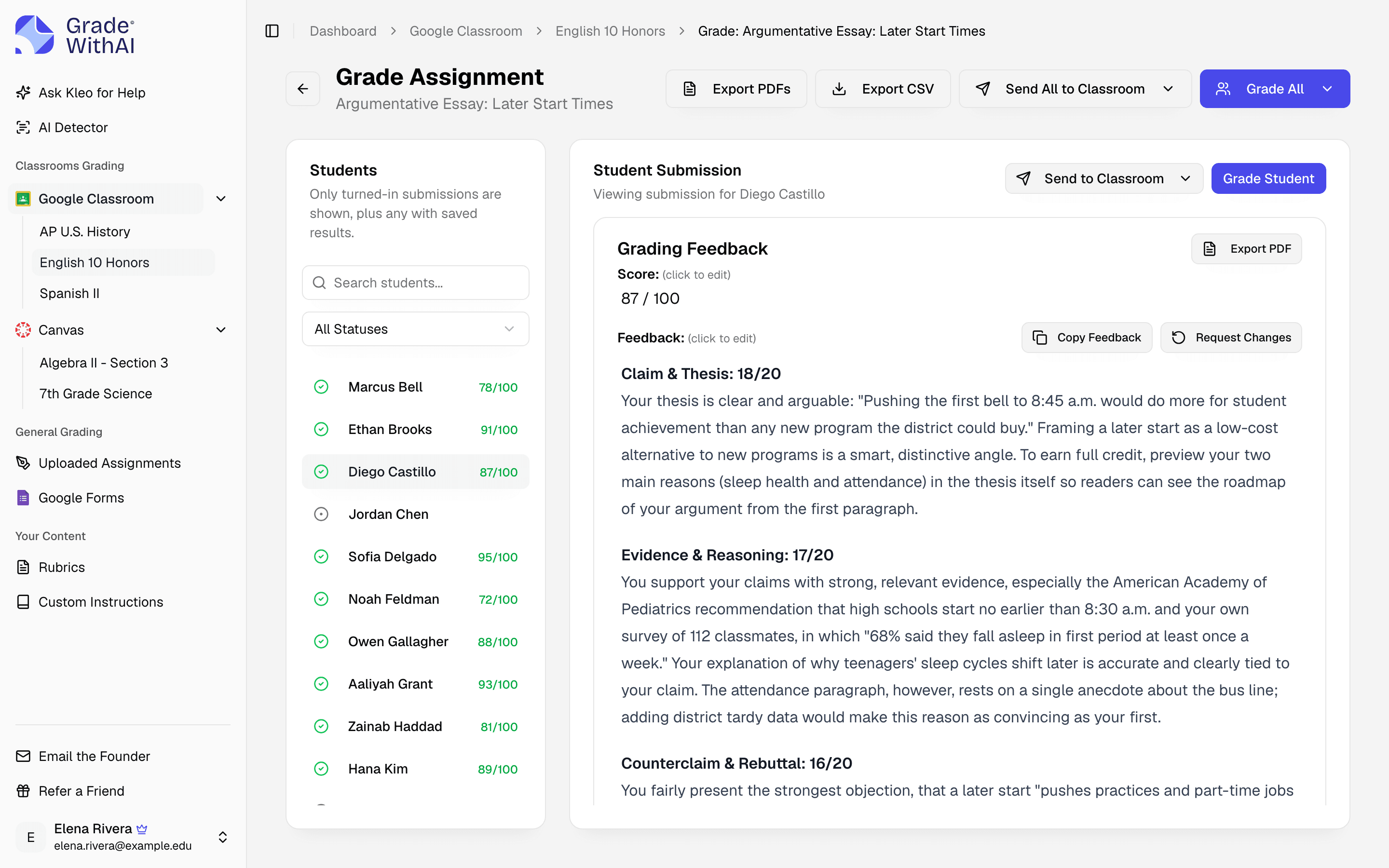
GradeWithAI grades essays turned in to Google Classroom as Google Docs, Word files, or PDFs. It scores each row of your rubric, quotes the student's own sentences in its comments, and sends the score and feedback back to Classroom after you review them.
Trusted by 21,000+ teachers, including teachers at
What GradeWithAI checks in essays
- Reads Google Docs in place
- Essays submitted as Google Docs are read straight from Drive. Word files and PDFs work the same way.
- Thesis and argument
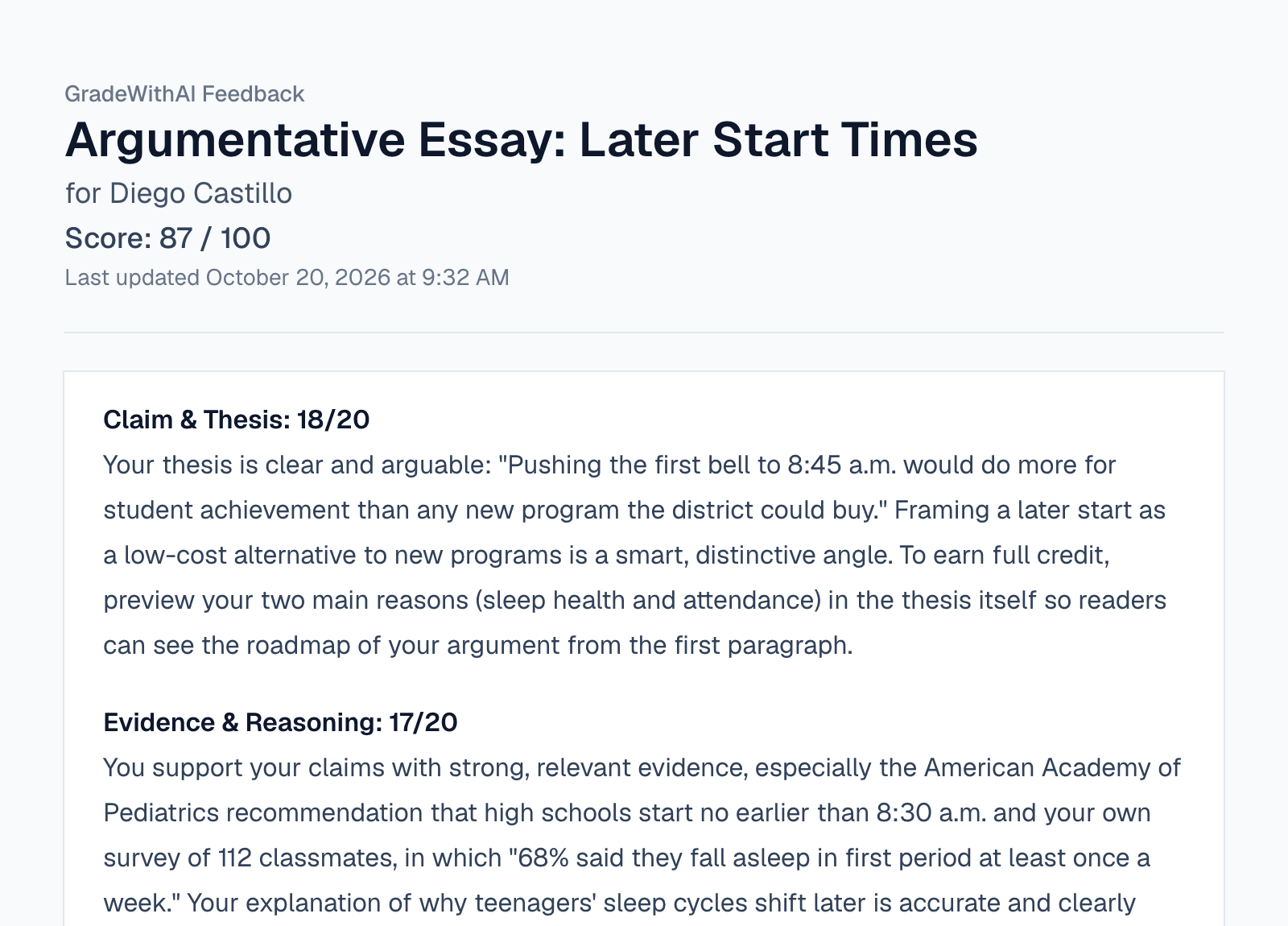
- Comments say whether the thesis is arguable and whether the evidence supports it, and quote the sentence in question.
- Organization and conventions
- Comments on structure, transitions, grammar, and citations, each scored against a row of your rubric.
- Scores back to Classroom
- Send score and feedback for one student or the class. Works on assignments created or reposted from GradeWithAI.
Essays it grades in Google Classroom
Argumentative, narrative, and literary analysis essays turned in as Google Docs, Word files, or PDFs.
- Argumentative, narrative, expository, and literary analysis essays
- The same rubric applied to every essay in the class
- Comments that quote the student's own sentences
- AI-use score on each essay (Pro)
- Scores go to the Classroom gradebook when you send them
How to grade essay assignments in Google Classroom
- 1
Connect Google Classroom
Sign in with Google and approve Classroom access. Your courses and turned-in work appear in the sidebar.
- 2
Set up an assignment
Pick the essay assignment, enter the max score, and choose or generate a rubric. To send grades back, create or repost the assignment from GradeWithAI.
- 3
Review and send
Edit anything you disagree with, then send scores and feedback to Classroom.
More on the Google Classroom connection: AI grading for Google Classroom
Essay grading in Google Classroom: FAQ
Answers to common questions from teachers and school leaders. Something not covered here? Email john@gradewithai.com.
Yes. GradeWithAI reads Google Docs from the submission, so there's nothing to download or convert. Word files and PDFs work too.
Against your rubric, one row at a time: thesis, evidence, organization, conventions, or whatever your rows are. Each row gets a score and a comment that quotes the student's writing.
Yes. The score goes to the gradebook and the feedback is attached to the student's submission as a link to their feedback page. This works on assignments created or reposted from GradeWithAI.
Yes. Upload your rubric as a PDF or Word file, or generate one from the assignment instructions. Each criterion is scored separately.
Yes. Choose shorter, default, or longer feedback for each assignment, and add custom instructions such as "don't deduct for MLA formatting."
Last updated
More Google Classroom grading
Other ways to connect
 Canvas
 Google Forms
 Microsoft Teams
AI grading by assignment type
Grade your next essay assignment in Google Classroom
21,000+ teachers have graded 2,000,000+ student submissions with GradeWithAI.
Free plan · No credit card required
Reported by teachers using GradeWithAI, with feedback on every submission they grade.


