AI math grading for Google Classroom
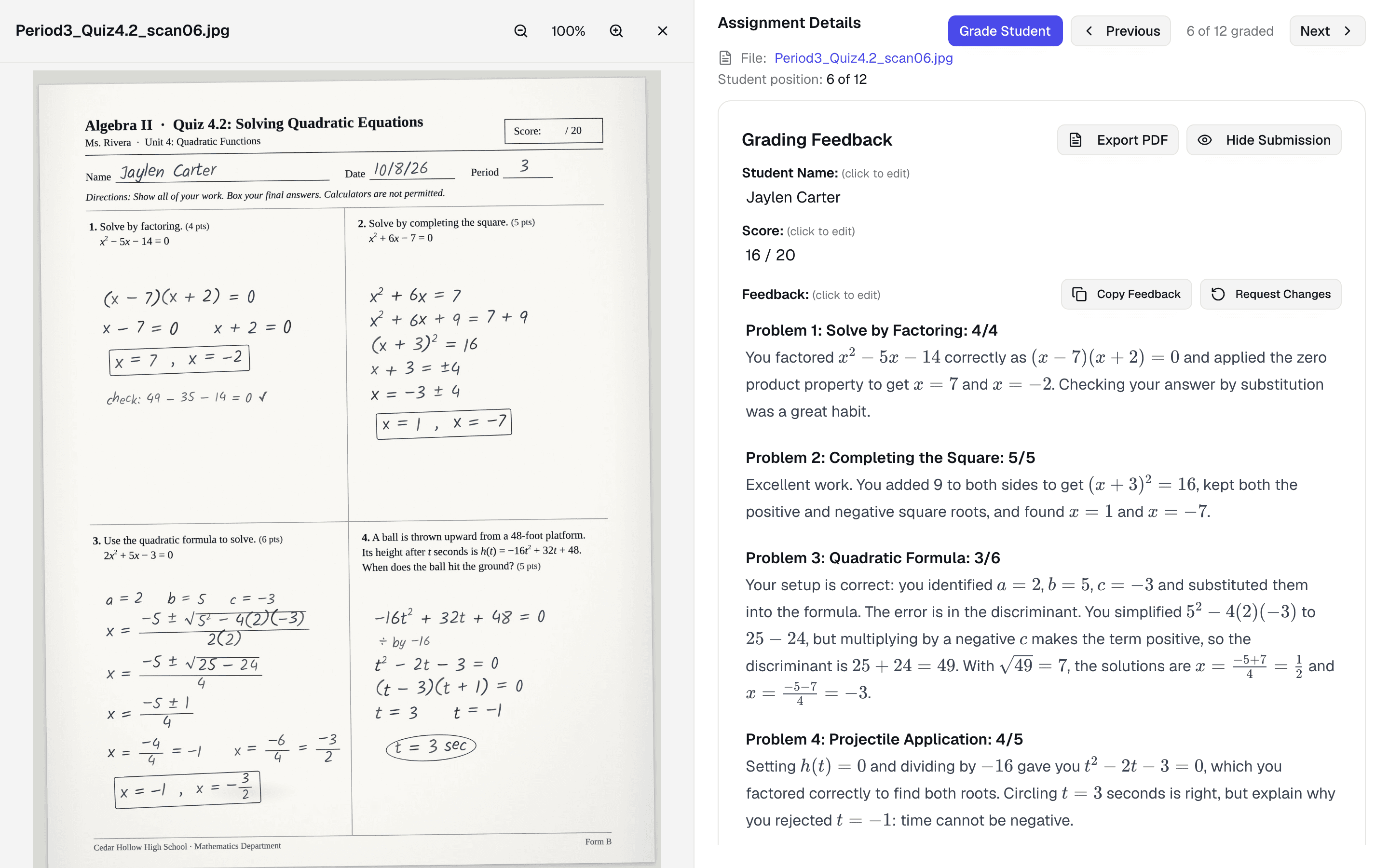
GradeWithAI grades math homework and tests turned in to Google Classroom, including photos and scans of handwritten work. It checks each step, gives partial credit by your rules, and says in its feedback where the work went wrong.
Trusted by 21,000+ teachers, including teachers at
What GradeWithAI checks in math work
- Handwritten work from photos and scans
- When students photograph their work and turn it in, GradeWithAI reads the equations and steps from the image, from long division to derivatives.
- Step-by-step feedback
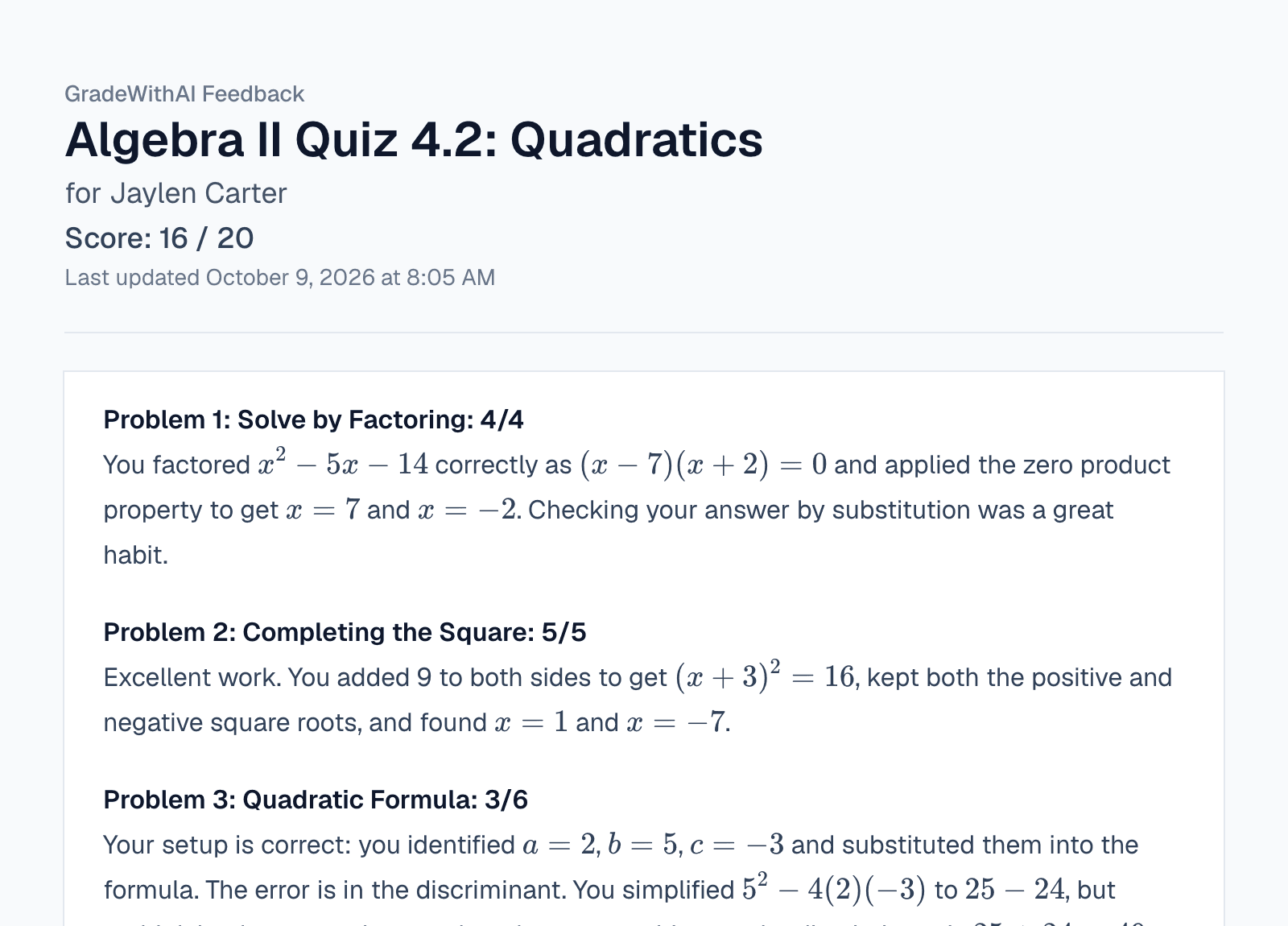
- Feedback follows the student's work line by line and names the step where it went wrong, such as a sign error in the discriminant.
- Partial credit by your rules
- Set how points split, for example 2 of 3 for a correct setup with an arithmetic slip, and every student is graded the same way.
- Google Forms math quizzes
- Grade the short-answer math questions on a Google Forms quiz and send the scores to a Classroom assignment.
Math assignments it grades in Google Classroom
Homework, quizzes, and unit tests, typed or photographed.
- Algebra, geometry, calculus, and statistics
- Partial credit for a correct setup and method
- Separates a setup error from an arithmetic slip
- Scores go to Classroom when you send them
How to grade math assignments in Google Classroom
- 1
Connect Google Classroom
Sign in with Google and approve Classroom access. Your courses and turned-in work appear in the sidebar.
- 2
Set up an assignment
Pick the math assignment, enter the max score, and choose or generate a rubric with your partial-credit rules. To send grades back, create or repost the assignment from GradeWithAI.
- 3
Review and send
Edit anything you disagree with, then send scores and feedback to Classroom.
More on the Google Classroom connection: AI grading for Google Classroom
Math grading in Google Classroom: FAQ
Answers to common questions from teachers and school leaders. Something not covered here? Email john@gradewithai.com.
Yes. Photos and PDF scans of handwritten work are read step by step. If a photo is blurry or cropped, check that student's score before you send it.
You set the rules in your rubric or custom instructions, for example 2 of 3 points for a correct setup with an arithmetic slip. Each step is checked against them, and the feedback says where points were lost.
Yes, for short-answer and paragraph questions. Forms keeps scoring multiple choice; GradeWithAI grades the written answers and can send the scores to Classroom.
Elementary arithmetic through AP Calculus and college statistics. Put the course and grade level in your rubric or custom instructions so feedback matches what you taught.
Last updated
More Google Classroom grading
Other ways to connect
 Canvas
 Google Forms
 Microsoft Teams
AI grading by assignment type
Grade your next math assignment in Google Classroom
21,000+ teachers have graded 2,000,000+ student submissions with GradeWithAI.
Free plan · No credit card required
Reported by teachers using GradeWithAI, with feedback on every submission they grade.