AI math grading for Canvas
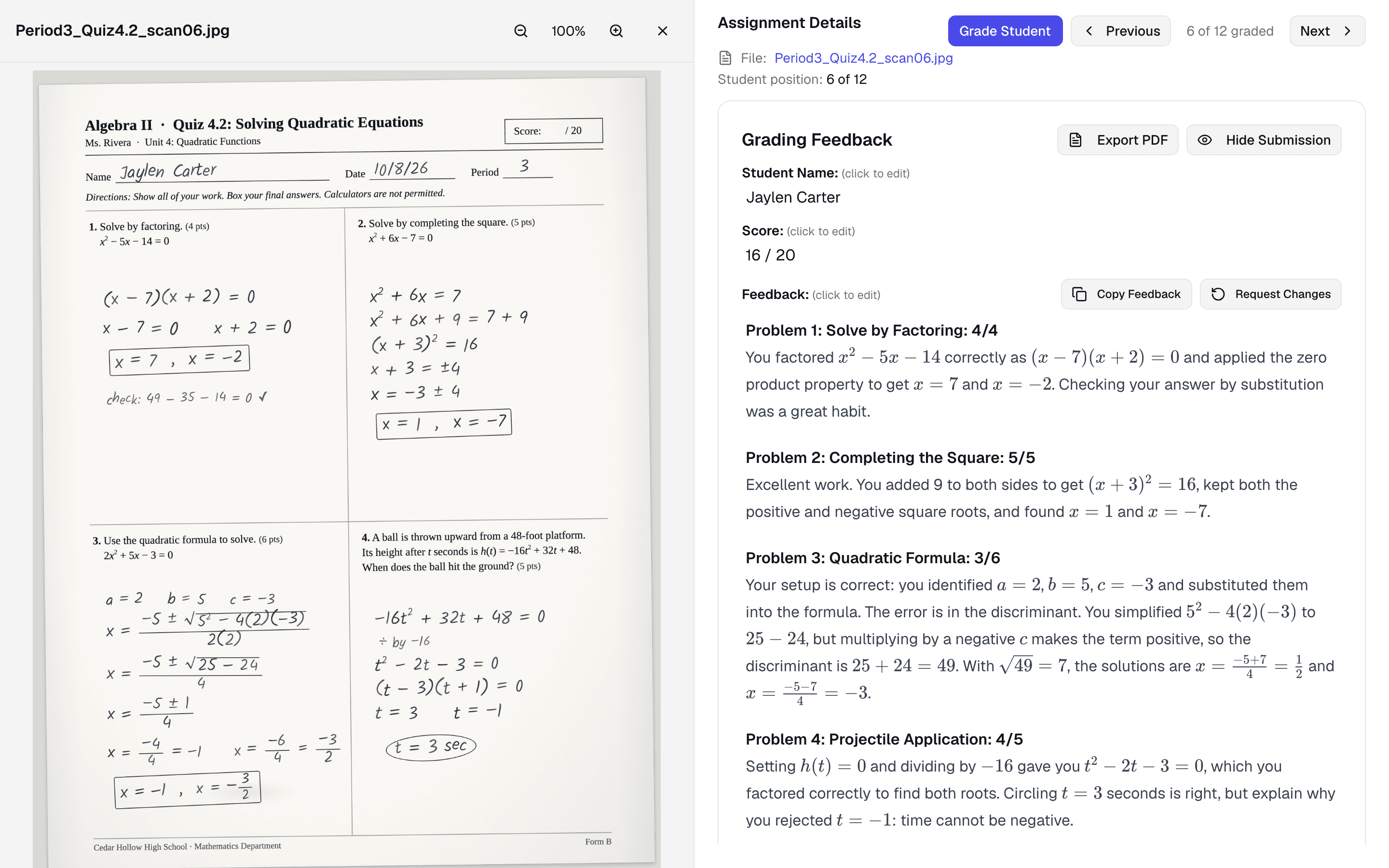
GradeWithAI grades math submitted to Canvas as PDFs, images, or quiz file uploads, including scans of handwritten work. It checks each step, applies your partial-credit rules, and posts the score and comment to SpeedGrader after you review.
Trusted by 21,000+ teachers, including teachers at
What GradeWithAI checks in math work
- Step-by-step feedback
- Feedback follows each solution line by line and names the step where it went wrong.
- Handwritten math
- Grade PDFs and images of handwritten work. GradeWithAI reads the equations and notation from the page.
- Partial credit by your rules
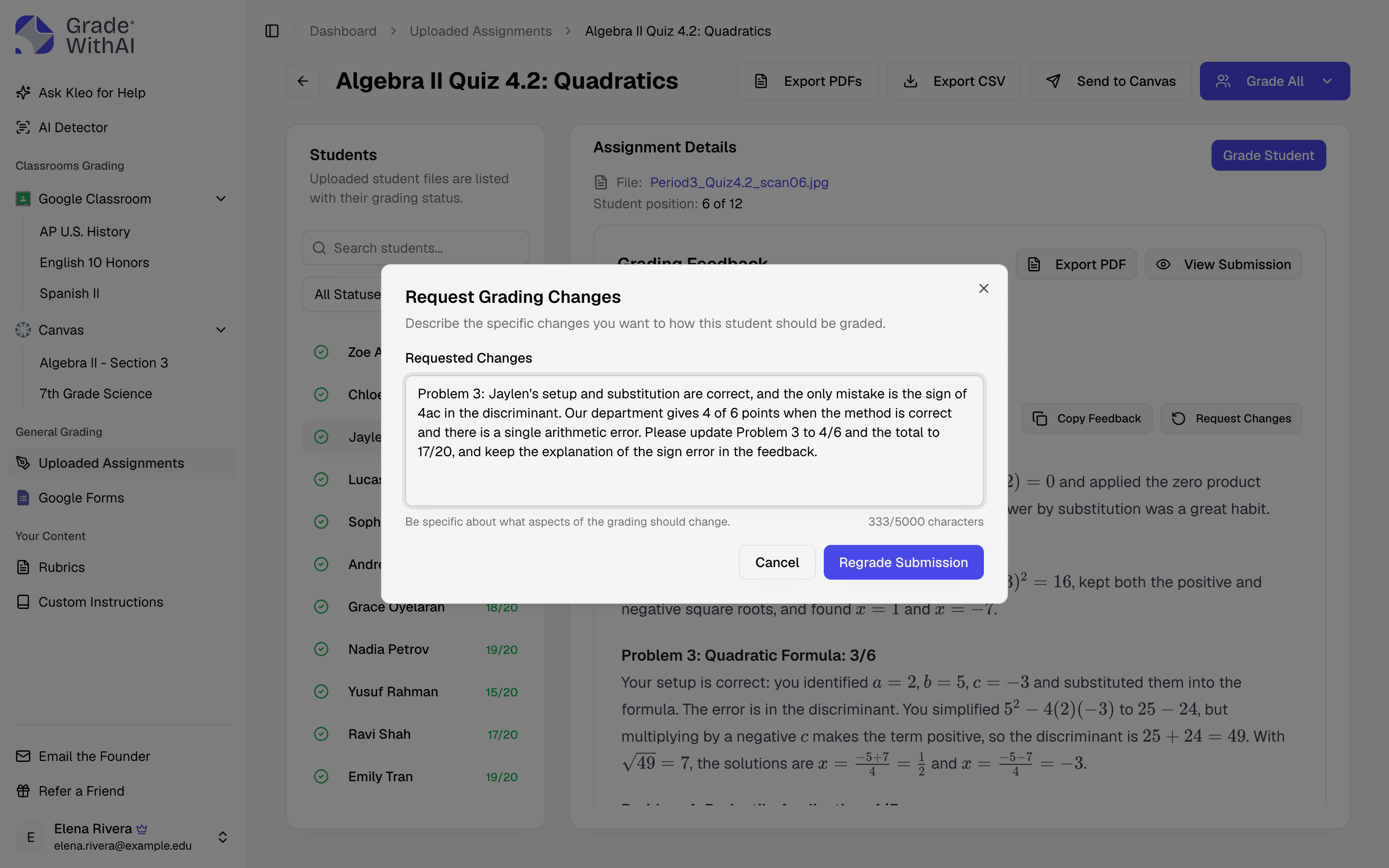
- Set how points split, for example 4 of 6 for a correct method with one arithmetic error, and every student is graded the same way. If one score is off, regrade it with a note.
- Scores and comments in SpeedGrader
- Send scores and feedback to Canvas after you review them.
Math assignments it grades in Canvas
Homework sets, unit tests, and quiz file uploads, typed or handwritten.
- Homework sets, unit tests, and quiz file uploads
- Partial credit for a correct setup and method
- Separates a setup error from an arithmetic slip
- Grades post to SpeedGrader when you send them
How to grade math assignments in Canvas
- 1
Connect Canvas
In Canvas, open Account → Settings → New Access Token. Paste the token and your Canvas URL into GradeWithAI.
- 2
Set up an assignment
Pick the math assignment or quiz, enter the max score, and choose or generate a rubric with your partial-credit rules.
- 3
Review and send
Grade the class, edit any score or comment, then send scores and comments to SpeedGrader.
More on the Canvas connection: AI grading for Canvas
Math grading in Canvas: FAQ
Answers to common questions from teachers and school leaders. Something not covered here? Email john@gradewithai.com.
Yes. Students can upload PDFs or photos of their work, and GradeWithAI reads the equations and steps. If a photo is blurry or cropped, check that student's score before you send it.
By the rules in your rubric or custom instructions. If a score looks off, use Request Changes with a note such as "give 4 of 6 when the method is right" and that submission is regraded.
Yes, for Classic Quizzes: essay, short-answer, fill-in-the-blank, and file-upload questions where students show their work. Canvas still scores numerical and multiple-choice questions.
Arithmetic through calculus and statistics, from elementary school to college. Put the course in your rubric or custom instructions so feedback matches what you taught.
Last updated
More Canvas grading
Other ways to connect
 Google Classroom
 Google Forms
 Microsoft Teams
AI grading by assignment type
Grade your next math assignment in Canvas
21,000+ teachers have graded 2,000,000+ student submissions with GradeWithAI.
Free plan · No credit card required
Reported by teachers using GradeWithAI, with feedback on every submission they grade.