GradeWithAI vs Brisk Teaching
Brisk Teaching is a Chrome and Edge extension with 30+ AI tools for creating materials and giving feedback inside Google Docs and other apps. GradeWithAI is an AI grader that scores class sets and sends grades to Canvas or Google Classroom.
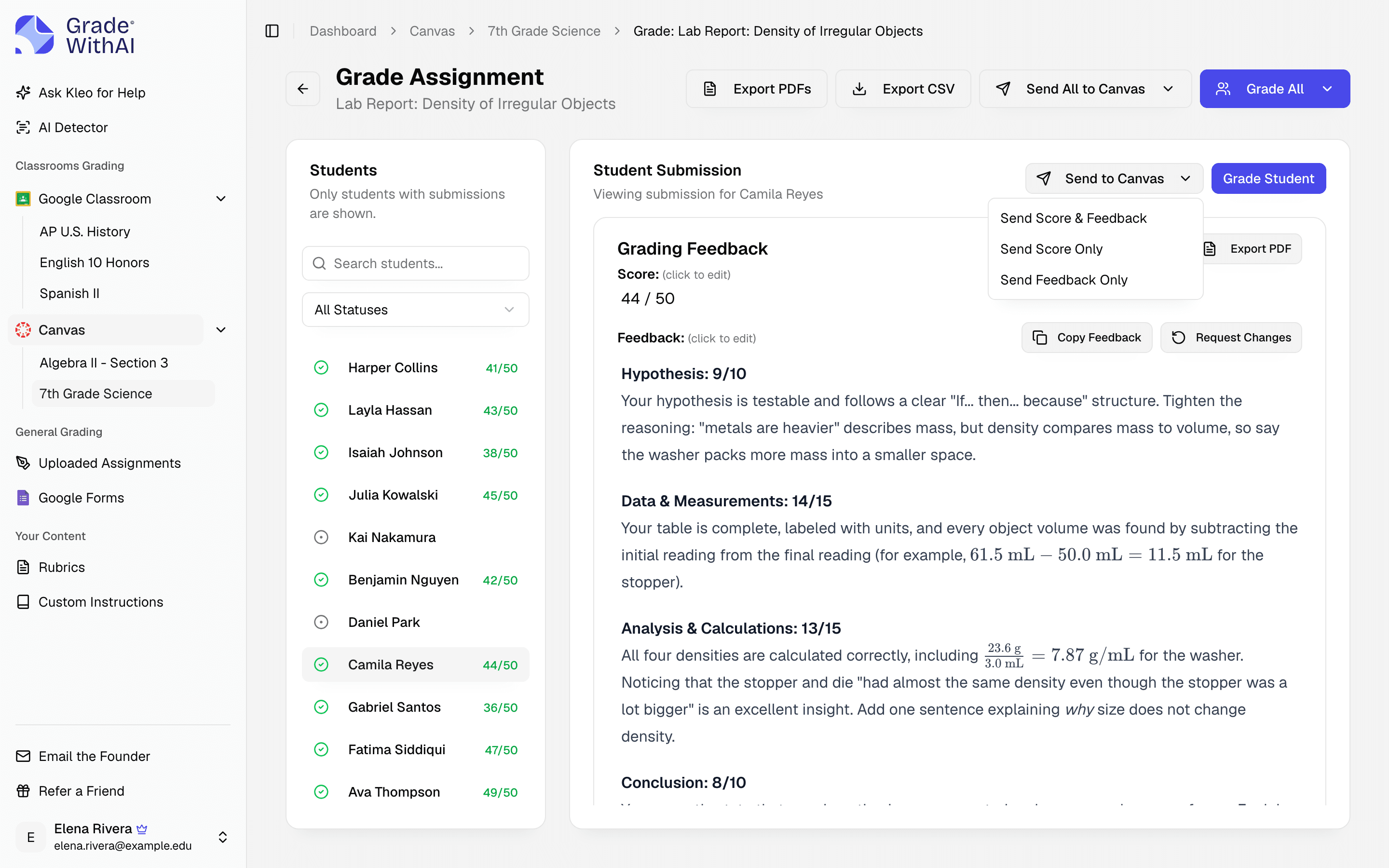
- GradeWithAI is best for
- Teachers who need a score and feedback on every submission, including math, handwritten tests, and Google Forms quizzes, sent to Canvas or Google Classroom.
- Brisk Teaching is best for
- Teachers who want AI inside Google Docs, Slides, and the browser for building lessons and quizzes, leveling texts, and commenting on drafts, especially in schools with a Brisk plan.
Where the products differ
Checked against each product's public documentation in October 2026.
| Criteria | GradeWithAI | Brisk Teaching |
|---|---|---|
| Built for | Grading class sets and returning scores and feedback. | AI help wherever teachers work: creating materials, leveling texts, and giving feedback in Docs, Slides, PDFs, and the web. |
| Feedback and scores | A draft score and comment for each criterion on every submission, which you review and edit. | Glow and grow, next steps, and rubric criteria feedback. Rubric scoring in feedback is an opt-in on school and district plans. |
| Whole-class grading | Import a Canvas or Google Classroom assignment, or upload a class set, and grade it in one run. | Batch Feedback on a Google Drive or OneDrive folder of student work, with an upload limit on the free plan. |
| Where results go | Reviewed scores and comments go to Canvas or Google Classroom, or export as a CSV and PDFs. | Feedback is added to the student's document once you approve it. The extension also runs inside Canvas, Schoology, and Google Classroom. |
| Academic integrity | Pro: a 0–100% AI score and a label on each submission with typed text. | Inspect Writing replays how a student wrote a document, including pasted text. |
| Price | Free: 25 graded submissions every 30 days. Pro: $20 a month or $120 a year. | Free plan with 20+ tools. Premium and Intelligence plans are sold to schools and districts, priced per student. |
Brisk Teaching details checked against briskteaching.com, including its plans, feedback, and integrations pages, in October 2026.
Where GradeWithAI fits better
- Scores every submission and sends reviewed grades to Canvas or Google Classroom.
- Reads handwritten tests from phone photos and scans, including math notation.
- Grades Google Forms short answers and Canvas quizzes and discussions.
- Any teacher can buy Pro for $20 a month or $120 a year without a school contract.
How to test it against Brisk Teaching
- 1Pick one recent assignment you already graded, and its rubric.
- 2Connect Google Classroom or Canvas, or upload the files.
- 3Grade the set and compare the draft scores and comments with your own.
- 4Keep Brisk for creating materials and draft comments, and use GradeWithAI when the work needs a grade.
More comparisons
GradeWithAI vs MagicSchool
For teachers who mainly want AI to grade class sets in any subject and send scores back to their LMS.
GradeWithAI vs ChatGPT
For teachers who have graded in a chat window and want a class roster, a review step, and grade sync.
GradeWithAI vs EssayGrader
For teachers who grade math, tests, and quizzes in the same week as essays, in any subject.
Further reading: AI grading tools for teachers, Grading software for teachers, VibeGrade alternatives
Brisk Teaching comparison questions
Answers to common questions from teachers and school leaders. Something not covered here? Email john@gradewithai.com.
Brisk gives AI feedback on student work, including rubric criteria feedback and Batch Feedback for a folder of assignments. Rubric scoring in feedback is an opt-in on its school and district plans. GradeWithAI scores every submission on every plan and sends grades to Canvas or Google Classroom.
Brisk's free plan for teachers includes 20+ tools. Its Premium and Intelligence plans are sold to schools and districts with custom, per-student pricing (as of October 2026). GradeWithAI's free plan grades 25 submissions every 30 days, and Pro is $20 a month or $120 a year.
Yes. Brisk works inside Google Docs and the browser for planning and comments on drafts. GradeWithAI grades the finished work and returns scores to your LMS.
Yes. It grades PDFs, Word files, slides, phone photos, Google Forms responses, and Canvas quizzes and discussions.
Last updated
Grade your next class set with GradeWithAI
Try it on one class set. The free plan grades 25 submissions every 30 days.
Free plan · No credit card required
Reported by teachers using GradeWithAI, with feedback on every submission they grade.