The AI assignment grader for any student work
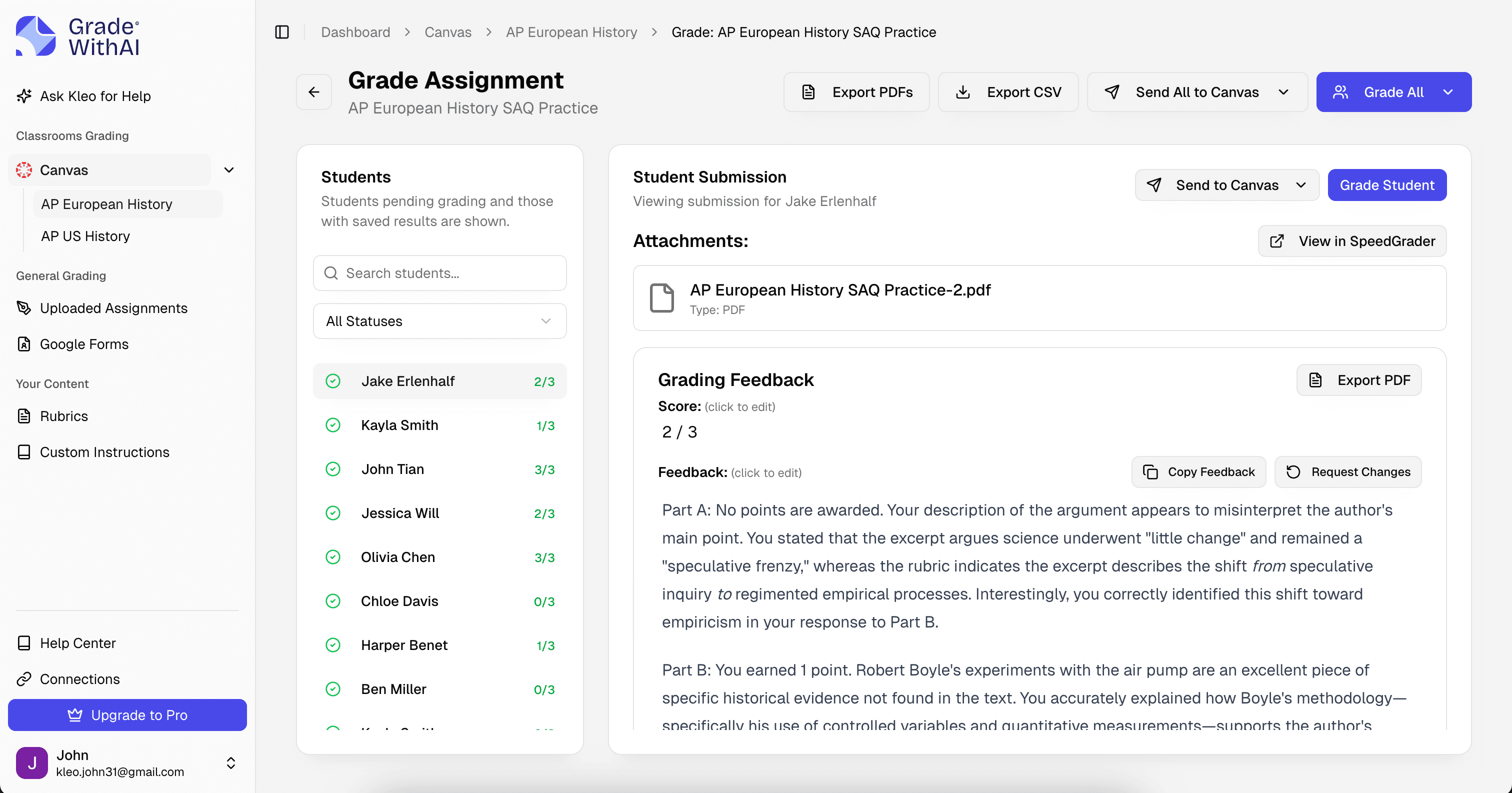
One grader for every assignment you collect — essays, short answers, worksheets, projects, lab reports, reflections. Upload the work, pick the rubric, and the AI delivers rubric-aligned feedback you can edit before grades reach students.
Free plan · Works with any rubric · Any subject, any grade level
Trusted by 10,000+ teachers for assignment grader
Why teachers need an AI assignment grader
Every subject, every grade level, the same Sunday-night stack.
Most teachers collect several different assignment types per week — a writing piece, a worksheet, a project, a lab report, a short-answer quiz. Each one has its own rubric, its own pacing, its own feedback expectations. The tool sprawl alone is exhausting: one app for essays, another for quizzes, a third for rubrics. What actually moves the workload is a single AI assignment grader that adapts to whatever you put in front of it.
- Different rubrics, same exhaustion
- A rubric for the essay, a rubric for the project, a rubric for the lab report. Switching between them eats as much time as the grading itself.
- Tool sprawl
- Separate tools for essays, bubble sheets, rubrics, and AI detection means four logins, four learning curves, and four places feedback lives.
- Feedback debt
- When grading takes too long, feedback gets skipped or compressed to a letter grade. Students learn nothing from a number at the top of the page.
One AI assignment grader, every format
An AI assignment grader that handles every assignment type you collect
The AI assignment grader handles essays, short answers, worksheets, projects, lab reports, reflections, presentations, and anything else you grade with a rubric. Upload the work, drop in the rubric, and the system adapts. You are not switching tools by assignment type — you are reviewing one queue per class.
- Rubric-first design
- Whatever rubric you supply — department, state, custom, or generated from the assignment — the AI uses it as the source of truth for every score and comment.
- Any format in one queue
- Text, scanned PDFs, Google Docs, Canvas submissions, Google Classroom turn-ins, photo uploads — all the formats you actually receive, graded in one pass.
- Editable before grades post
- Every AI-generated score and comment is a draft until you approve. Edit, rewrite, or delete anything before the gradebook updates.
Example rubric
A general assignment rubric that scales across content
When no rubric is provided, the AI generates a general four-criterion rubric from the assignment prompt. You can keep it, edit it, or replace it with your own — state, district, department, or personal.
Assignment grader rubric · AI-generated
Task completion
4 ptsAll required parts of the assignment are present and addressed.
- Strong
- Every part of the assignment is completed with the expected depth.
- Developing
- Most parts are present; one or two are thin or incomplete.
- Beginning
- Multiple required parts are missing, off-prompt, or superficially addressed.
Content accuracy
4 ptsFactual claims, calculations, or reasoning are correct and specific.
- Strong
- Claims are accurate, specific, and support the assignment's goals.
- Developing
- Most claims are accurate; one or two contain minor errors or imprecision.
- Beginning
- Significant factual or conceptual errors appear across the assignment.
Organization & clarity
3 ptsInformation is organized logically and communicated clearly.
- Strong
- Order is intentional; sections and paragraphs flow with purpose.
- Developing
- Order is present but uneven; transitions feel mechanical or abrupt.
- Beginning
- Structure is unclear; the reader struggles to follow the progression of ideas.
Conventions
2 ptsGrammar, spelling, formatting, and citation meet the assignment's expectations.
- Strong
- Minor errors that do not interfere with meaning.
- Developing
- Noticeable errors but meaning is generally clear.
- Beginning
- Frequent errors that distract the reader from the content.
Class-wide analytics
See what the whole class missed, not just what each student missed
After every graded assignment, you get a rubric-by-rubric, criterion-by-criterion view of where the class landed. Which rubric row did every section underperform on? Which question did 70% of the class get wrong for the same reason? That is where tomorrow's mini-lesson comes from, not from guessing.
- Question 1
- 92%
- On track
- Question 2
- 78%
- On track
- Question 3
- 41%
- Reteach
- Question 4
- 85%
- On track
- Question 5
- 36%
- Reteach
- Question 6
- 69%
- Watch
Reteach focus · Questions 3 and 5 flagged for class-wide review tomorrow.
- Criterion-level distribution
- See the score distribution for each rubric criterion so you can name exactly where to reteach.
- Common error patterns
- The AI groups similar mistakes across students — e.g., ten students all confused cause and correlation — so you do not have to pattern-match by hand.
- Trends across assignments
- Watch the same rubric row over the semester and see whether the class is actually improving on it.
Sample AI feedback
Rubric-specific comments, not generic praise
Here is the AI feedback on one criterion of a cross-disciplinary project. Notice it quotes the student's actual work, names the rubric language, and gives a concrete revision path.
Assignment prompt
Create a one-page infographic that explains the causes of the 2008 financial crisis for a general audience.
Student submission
The 2008 crisis happened because banks gave out bad loans. People could not pay back their loans and the banks lost money. Then the stock market crashed and the economy went down.
AI feedback · Content accuracy
2 / 4The core intuition is correct — defaults led to losses that cascaded into a broader crisis — but the explanation lands in the “Developing” band because the specific mechanism is missing. “Bad loans” does not tell a general reader why those loans caused a systemic failure. Adding the role of securitization (bundling loans into tradeable assets) and leverage (banks holding many times their capital in these assets) takes the explanation from folk-level to mechanism-level without becoming jargon-heavy.
Revision tip · Try naming the specific mechanism: subprime mortgages were bundled into mortgage-backed securities, which amplified the losses when defaults rose. A general audience can follow causal mechanism if it is named; they cannot follow a chain described only as “bad loans.”
- Quotes the student's actual work
- Feedback points to specific sentences and claims the student wrote, not vague impressions.
- Names the rubric language
- Comments reuse the criteria you set, so students learn what the rubric actually asks for.
- Suggests a concrete revision
- Every comment ends with a specific next step the student can take on the next draft.
Built for assignment grader
Every detail, handled
- Handles mixed-format classes
- Digital submissions, scanned paper, Google Docs, Canvas uploads, and phone photos all land in the same grading queue without manual conversion.
- Works across subjects
- Whether you teach English, math, history, science, world language, or electives, the grader adapts to the rubric and content you provide.
- LMS sync
- Push scores and comments back to Canvas SpeedGrader, Google Classroom, or Schoology in one click — no re-entering anything.
- AI detection on every submission
- Every graded assignment includes an AI-use score with highlighted passages at no extra cost on the free plan.
Why teachers switch
The AI assignment grader that replaces your grading tool stack
Teachers who consolidate on GradeWithAI as their AI assignment grader report reclaiming the hours previously spent switching between rubric tools, bubble sheet scanners, and essay graders. One queue, one workflow, one place feedback lives — no matter how many assignment types are in the pile.
Every assignment type graded in the same workflow
Any rubric accepted — department, state, district, or personal
Class-wide analytics per assignment, not just per student
Editable scores and comments before anything posts
Handles digital and paper submissions in the same queue
Syncs back to Canvas, Google Classroom, and Schoology
“I've really enjoyed using the GradeWithAI program. It saves me a ton of time, especially when I have class sizes of 35 or 36 students times five.”

Why it matters for assignment grader
Teachers who consolidate on GradeWithAI as their AI assignment grader report reclaiming the hours previously spent switching between rubric tools, bubble sheet scanners, and essay graders. One queue, one workflow, one place feedback lives — no matter how many assignment types are in the pile.
How assignment grading works
From collected to graded in minutes
The same three steps whether the assignment is an essay, a worksheet, or a lab report.
- 1
Pull in the work
Import from your LMS, forward from email, drag in files, or scan paper. Every format lands in one grading queue.
- 2
Lock the rubric
Use your own rubric, generate one from the assignment prompt, or tweak a built-in default. The AI applies it consistently.
- 3
Review and return
Scores and comments are drafted for you. Approve, edit, or rewrite, then push everything to your gradebook.
Also covered
Assignment grading by type
Each assignment type has its own dedicated workflow, but everything runs on the same grader:
- Essay grader
- Formal essays graded against rubrics with quoted evidence and AI-use detection.
- Test grader
- Mixed-format tests — multiple choice, short answer, and essay — graded in one pass.
- Short-answer grader
- Constructed-response questions graded for accuracy and specificity at scale.
- Writing grader
- Narratives, journals, reflections, and any other student writing graded against your rubric.
Simple, transparent pricing
Start free and upgrade when you’re ready.
Free
Perfect for trying out AI grading.
- 25 AI requests/month
- Google Classroom integration
- Canvas integration
- Google Forms grading
- Handwritten assignment support
- AI rubric generation
- Unlimited Kleo AI assistant
Pro
Unlimited grading for dedicated educators.
- Unlimited AI requests
- Automated submissions grading
- AI detection on every submission
- Custom instructions
- Everything in Free
Schools & Districts
CustomEnterprise features for your entire school.
- Bulk user management
- Admin dashboard & analytics
- SSO / SAML authentication
- Dedicated onboarding & training
- Everything in Pro
Secure by design.
Built for K-12.
FERPA-aligned workflows, encryption everywhere, and no student data in model training. Ready for your district’s IT review from day one.
- FERPA-aligned
- SOC 2 practices
- AES-256 at rest
- TLS 1.2+ in transit
- Role-based access
- No AI training
- FERPA-aligned by default
- Role-based access and audit trails protect student submissions and grades.
- Never used for training
- Student work is processed for grading only — never used to train AI models.
- District-ready docs
- Security documentation and procurement support ready for your IT team.
Questions, answered
Assignment grader FAQ
Answers to the questions we hear most from teachers using GradeWithAI for assignment grader. Start a free account and explore in minutes, or email john@gradewithai.com for a fast reply.
Essays, short answers, worksheets, projects, lab reports, reflections, presentations, journals, research papers, problem sets, and anything else graded with a rubric. If you can describe the rubric, the AI can apply it.
By assignment
More grading guides


Ready to try the AI assignment grader that covers every format?
Every assignment type, every rubric, every section — one queue, one set of comments, one place where feedback actually lives.
Free plan available · No credit card required
Teachers using GradeWithAI report grading in a fraction of the time, with richer feedback for every student.

