Posttest generator
Make a posttest to measure growth after a unit: the same objectives and question count as your pretest, with new items and an answer key with explanations.
Free · No account · Answer key included · Print or save as PDF
Build your quiz
Describe the topic and set the details. You get a quiz with an answer key.
59/5000
Free · No sign-up · PDF export
GradeWithAI is used by 21,000+ teachers, including teachers at
What is a posttest?
A posttest is an assessment given after instruction to measure what students learned, usually compared with a pretest on the same objectives. This generator drafts a posttest from the objectives you list, with an answer key. Give it the same objectives and question count as your pretest so the two line up.
Lining up the pretest and posttest
Growth measurement works only when the pretest and posttest align: the same objectives, kinds of thinking, and number of questions, with different items so students can't answer from memory. Paste your pretest objectives, or the pretest itself, and ask for a parallel posttest.
The question count your pretest used (3 to 20)
The same objectives and topic spread
Multiple choice and short answer to sample different kinds of thinking
An answer key with explanations for reteaching
End-of-unit scope
A posttest covers the whole unit, so every major objective needs at least one item. Twenty questions give breadth for a long unit; ten are enough for a short chapter. Check the items against your objective list before giving the test.
Using the growth data
Compare each student's pretest and posttest scores by objective. A student who moved from 40% to 80% learned most of the unit; one who stayed at 60% needs a targeted reteach, and the explanations in the key can serve as a study guide.
How the quiz generator works
- 1
Describe the quiz
Enter the topic or paste the text, then set the grade, subject, number of questions, and difficulty.
- 2
Generate
The quiz and answer key usually take 20 to 40 seconds.
- 3
Check and print
Read the questions, turn answers on or off, and print or save a PDF.
What teachers say
Teachers across subjects, from AP history to astrophysics, on grading with GradeWithAI.
“I've really enjoyed using the GradeWithAI program. It saves me a ton of time, especially when I have class sizes of 35 or 36 students times five.”

“GradeWithAI doesn't just grade. It gives the student reasoning as to why every point is awarded or not awarded. That is a very valuable thing for the students.”

“More impressive though is that it corrects student answers not simply using a pre-written answer, but by following the thought process they've pursued.”

“For Chadwick users, GradeWithAI has improved feedback efficiency and effectiveness, as it is grounded in existing platforms and is highly adaptable.”

“GradeWithAI [provides] students with timely individualized feedback on their homework assignments and formative assessments. This is a job that is virtually impossible for a teacher to do on a regular basis.”

“Students have also appreciated the consistency and immediacy of the feedback I can provide through GradeWithAI. This has enabled them to make necessary corrections and achieve their desired scores on any assignment.”

Grade the completed quizzes with GradeWithAI
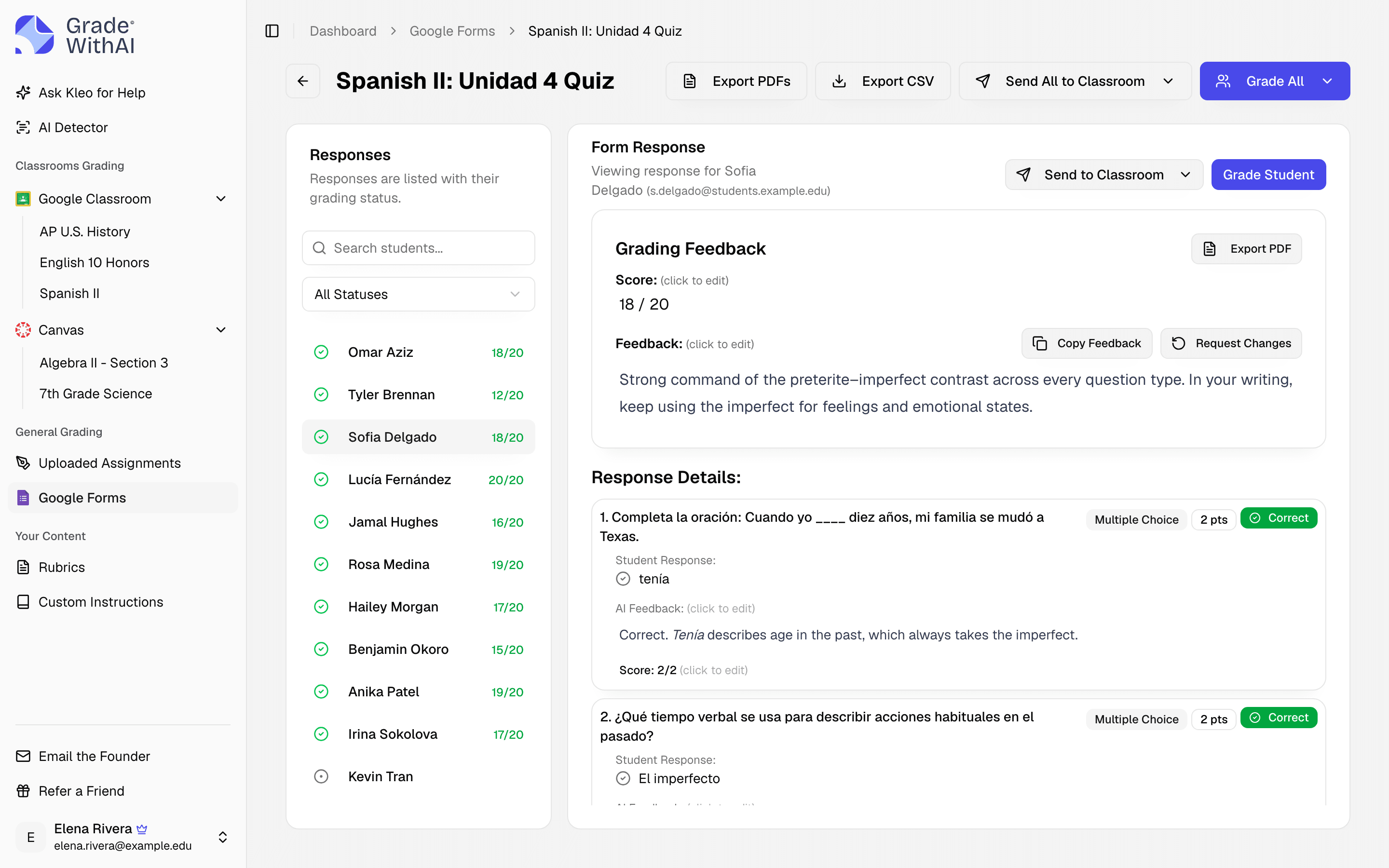
GradeWithAI grades completed quizzes against your answer key, including Google Forms short-answer questions.
Sync assignments from Canvas, Google Classroom, or Google Forms, or upload files from any other LMS
Reads typed work and handwritten pages from scans or phone photos
Edit any score or comment before students see it
Send scores and comments back to Canvas or Google Classroom, or export a CSV
Grading the completed tests and quizzes? See how the AI test grader works
Multiple choice, true or false, short answer, fill in the blank, and matching. Ask for specific types in the description, or leave it open for a mix.
Yes: easy, moderate, challenging, or mixed. Set the grade level too, since it changes the vocabulary and the kind of thinking the questions ask for.
Yes. Print or save a PDF without answers for students, then turn on Show answers and print again for a copy with the correct answers and explanations.
Yes, from pasted text. Paste up to 5,000 characters, such as a section of a chapter or an article, and the questions come from that text. There is no file upload, so copy the text out of a PDF first.
Not on the page. Copy the questions into your own document to change the wording, or generate again for a new set.
Yes. Generate again with the same description to get a different set of questions on the same material, for example for another class period or a makeup quiz.
Usually 20 to 40 seconds.
Upload the completed quizzes to GradeWithAI and add your answer key or rubric; the quiz doesn't carry over on its own. GradeWithAI also grades Google Forms quizzes, including short-answer questions, and needs a free account.
It is sent to an AI model to write the quiz. Nothing is saved to an account. Leave student names and other personal details out.
Yes, with no account or credit card.
Quiz generators by subject and purpose
Starting points for the quizzes teachers ask for most, with the topic and grade filled in.
Popular
Math
Science
English
Social studies
Grade level
Question types
Assessment purposes
Life skills
Health
Related tools
Grade the completed quizzes
21,000+ teachers use GradeWithAI to grade essays, tests, and handwritten work, and report saving 10+ hours a week.
The free plan grades 25 submissions every 30 days. No credit card.
Reported by teachers using GradeWithAI, with feedback on every submission they grade.