Subtraction problems generator
Make printable subtraction problems for K-5, with or without regrouping, including borrowing across zeros. Choose grade and difficulty; answer key included.
Free · No account · Up to 40 problems · Answer key included
Tip: Describe the specific skill or topic. The generator calibrates complexity to the grade level you pick.
GradeWithAI is used by 21,000+ teachers, including teachers at
How subtraction with regrouping works
Subtraction problems ask students to find a difference, and regrouping (also called borrowing) is the step where a student renames one ten as ten ones, or one hundred as ten tens, when the top digit is too small. This generator writes sets at your grade and difficulty, with an answer key.
The place-value work underneath
Subtraction runs through 1.OA.C.6 (within 20), 2.NBT.B.5 (within 100), 3.NBT.A.2 (within 1,000), and 4.NBT.B.4 (the standard algorithm). The extra step compared with addition is the regroup: students notice the top digit is smaller, take one from the next place, and adjust both digits.
Ways to shape the output
Set the range: within 10 for kindergarten, 20 for 1st grade, 100 for 2nd, and three or four digits for 3rd and 4th. Then pick a regrouping option:
No regrouping, for introducing the method
Regrouping in every problem: 504 − 287 = 217
Borrowing across a zero: 500 − 268 = 232, 403 − 157 = 246
Mixed sets for spiral review
Missing-number items (72 − __ = 45) for early algebraic thinking
Classroom fits
Use a 15-problem page as a warm-up, a reteach set when a quiz shows regrouping errors, or summer review. Pair it with the addition problems generator for a balanced fluency block.
How the math problem generator works
- 1
Describe the set
The topic and the format, such as two-step equations or fraction word problems about cooking.
- 2
Set the details
Grade, difficulty, and number of problems. It usually takes 10 to 20 seconds.
- 3
Check and print
Work a few problems yourself, then print the student copy and the answer key.
What teachers say
Teachers across subjects, from AP history to astrophysics, on grading with GradeWithAI.
“I've really enjoyed using the GradeWithAI program. It saves me a ton of time, especially when I have class sizes of 35 or 36 students times five.”

“GradeWithAI doesn't just grade. It gives the student reasoning as to why every point is awarded or not awarded. That is a very valuable thing for the students.”

“More impressive though is that it corrects student answers not simply using a pre-written answer, but by following the thought process they've pursued.”

“For Chadwick users, GradeWithAI has improved feedback efficiency and effectiveness, as it is grounded in existing platforms and is highly adaptable.”

“GradeWithAI [provides] students with timely individualized feedback on their homework assignments and formative assessments. This is a job that is virtually impossible for a teacher to do on a regular basis.”

“Students have also appreciated the consistency and immediacy of the feedback I can provide through GradeWithAI. This has enabled them to make necessary corrections and achieve their desired scores on any assignment.”

Grading the completed problem sets?
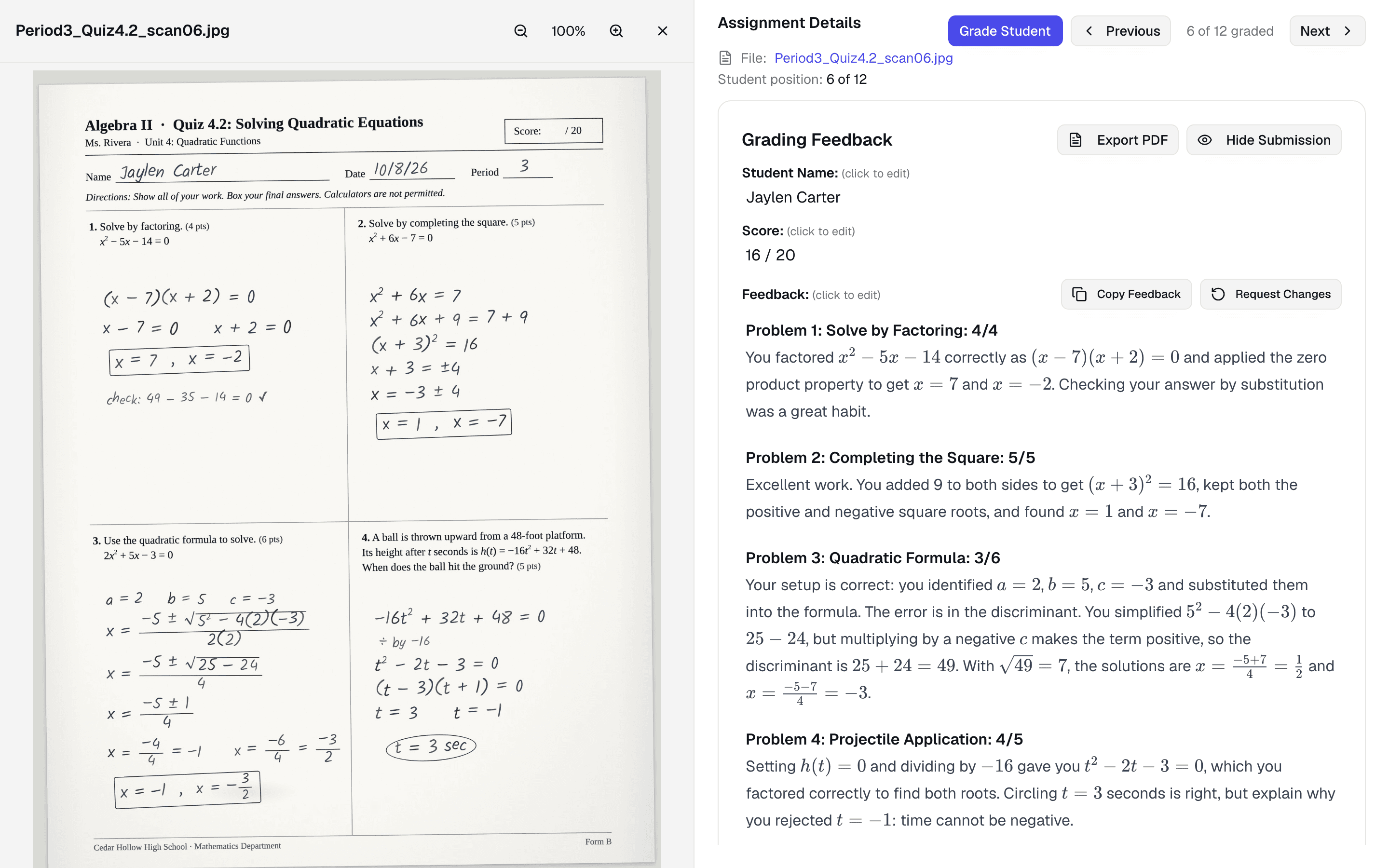
GradeWithAI reads handwritten math from scans or phone photos and gives partial credit under your rubric or answer key. You review each score before it posts.
Grading the completed math work? See how the AI math grader gives partial credit
Yes. Ask for 'subtraction across zeros' and the generator writes problems with a zero in the top number, such as 600 − 347, so students practice renaming twice.
Each item has an answer line, and the page is plain text. Students who need to stack the numbers can copy each problem into a column on scratch paper or graph paper you hand out.
Addition, subtraction, multiplication, division (including long division), fractions, decimals, ratios, percents, pre-algebra, Algebra 1 and 2, and geometry.
Yes. Ask for word problems in the description, and add a context such as sports, animals, or food if you like.
Pick the grade, which sets the kind of numbers and operations, then choose easy, medium, or hard.
Yes. Every problem has an answer, printed on a separate page. Work a few problems yourself before handing the set out, since AI-generated math can contain mistakes.
No. It writes problems. To grade completed work, upload it to GradeWithAI, which reads handwritten math and gives partial credit under your rubric or answer key.
Yes, with no account.
Math problems by grade and topic
Starting points with the grade and topic filled in.
By operation
- Addition problems generator
- Addition word problems generator
- Subtraction word problems generator
- Multiplication word problems generator
- Division problems generator
- Division word problems generator
- Long division problems generator
- Long division practice problems by level
- Fraction problems generator
- Fraction word problems generator
- Addition and subtraction word problems
- Multiplication and division word problems
By grade
- Math word problems generator
- 1st grade math word problems
- 2nd grade math word problems
- 3rd grade math word problems
- 4th grade math word problems
- 5th grade math word problems
- 6th grade math word problems
- Math problems for 2nd graders
- 3rd grade math problems
- 4th grade math problems
- 5th grade math problems
- 1st grade math problems
- 6th grade math problems
- 7th grade math problems
- 8th grade math problems
Algebra
Related tools
Grade the completed math work
21,000+ teachers use GradeWithAI to grade essays, tests, and handwritten work, and report saving 10+ hours a week.
The free plan grades 25 submissions every 30 days. No credit card.
Reported by teachers using GradeWithAI, with feedback on every submission they grade.